Preview





Description
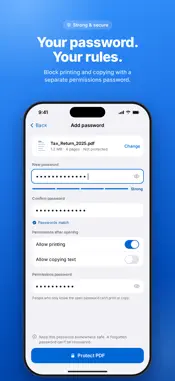
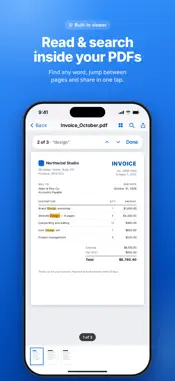
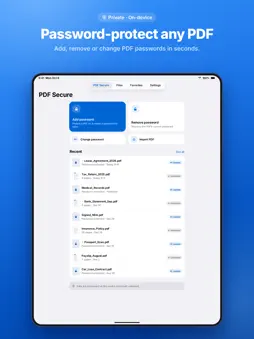
PDF Secure lets you add, remove and change PDF passwords in seconds — privately, right on your iPhone and iPad. Your documents are processed on your device and never uploaded. PROTECT ANY PDF - Add a password so only people you trust can open your document - See password strength as you type, and confirm it so you never mistype it - Control what readers can do: block printing or copying with a separate permissions password - Uses standard PDF password protection that works in all major PDF readers UNLOCK OR CHANGE PASSWORDS — THE RIGHT WAY - Remove a password when you know it, then save an unlocked copy or replace the original - Change a password in one simple step - PDF Secure never bypasses, cracks or recovers passwords — you always need the document's current password KEEP EVERY PDF IN ONE PLACE - Import PDFs from Files, Mail, Safari or any app with "Open in" - Every file you import or create is saved in your library, ready when you need it - Add favorites, search, and sort by name, date or size - Switch between list and grid view with page previews - Rename, share or save to Files anytime — swipe to delete, with Undo BUILT-IN PDF VIEWER - Read documents without leaving the app - Find any word and jump between results - Browse pages quickly with page thumbnails PRIVATE BY DESIGN - Lock the app with Face ID, Touch ID or your passcode - Files are stored on your device and protected by iOS Data Protection - No account, no sign-up, no tracking - Optionally auto-delete saved files after 1, 7 or 30 days MADE FOR IPHONE AND IPAD - Clean, native design with Dark Mode and larger text support - Full iPad support, including Split View and Slide Over Perfect for contracts, tax returns, bank statements, medical records, invoices, IDs and any document you want to keep private. Questions or ideas? Tap "Send Feedback" in Settings — we'd love to hear from you.
Technical Analysis
Package Overview Basic metadata
Bundle ID
com.securepdfpass Current Version 1.0
Minimum iOS 15.0
Package Size App Store Size
Package Metadata 0 / 1 version records
Detailed binary, privacy manifest, framework, and Info.plist results have not been indexed for this package yet. The verified App Store and archive metadata above remains available.
Developer Information
Known Version Records
0 version records with stored package metadata • 1 known version records
Stored metadata does not guarantee a package is currently available to download.
| Details | Version / IDs | Version date | Action |
|---|---|---|---|
| Not archived | App Store ID: 892418317 | Unknown | Request Version |