
Preview






Description
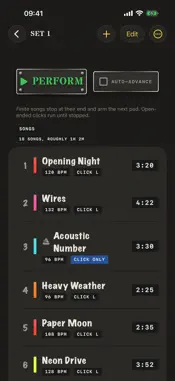
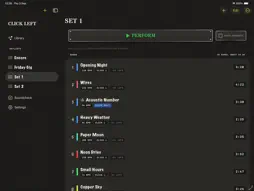
Click Left plays your backing tracks and click on stage from an iPad or iPhone. Send the click to your in-ears and the mix to the desk, then start each song from a big pad when the band is ready. Build a setlist or open a single song. Tap any song in your library and it opens on the stage, armed, and nothing plays until you hit Play. Metronome sets are first-class. Open the full-screen Metronome without building a setlist, or add click-only songs to a set. The stage locks so a stray stick can't retune the click, and you unlock it with a slide rather than a tap. Beat lamps show the bar from the stool, and a scan line sweeps them while the click runs. On iPhone the stage works upright or on its side, with big pads and the same Play, Stop and click controls. Keep a phone in the gig bag as a spare, or run a small gig from it. iCloud sync is optional. Turn it on in Settings on each device and your songs, setlists and bands stay the same on every iPad and iPhone signed in to your iCloud, with the audio too if you want it. Nothing syncs while the stage is up. A track with no click of its own can have one added. On iOS 27 Click Left listens to the whole track for its beat, then you hear the click against the start, the middle and the end before it goes on stage. A track played without a click, that speeds up as it goes, gets a click that follows it bar by bar. The added click goes to your ears only, never to the desk. Cues can be spoken in your ears: "Chorus" on beat one of the bar before the chorus, or a spoken count-in instead of clicks. Only you hear them. A Bluetooth or USB MIDI foot switch can play, stop, move through the set and tap the tempo. It does one job. There are no lyrics, no mixer and no plugins. It replaces a laptop or hardware sampler for drummers who want the track to start, play and stop. Free to try with six songs and one setlist. One unlock removes the limits on all your devices, with no subscription and no account. Click Left collects no data. Synced songs go to your own iCloud, which we can't see. The optional Apple Music song lookup only runs when you tap Look up song. For iPad and iPhone. Requires iPadOS 26 or iOS 26 or later.
What's New
Version 2.3 2026-11-28
• Add a click to a track that has none. On iOS 27 Click Left listens to the whole track, finds the tempo and bar one, and tells you how closely the click holds ...• Add a click to a track that has none. On iOS 27 Click Left listens to the whole track, finds the tempo and bar one, and tells you how closely the click holds to the band all the way through. You hear it at the start, the worst spot and the end before it goes on. A track that drifts gets a click that follows it bar by bar. On iOS 26 you set the tempo and bar one by ear. The click only ever goes to your ears. • Song details show tempos to two decimal places. • The stage fits an iPad mini, keeps the same rail between songs, and keeps bigger pads at Huge text. • Clearer VoiceOver on the pads, Play, Stop and the click trim, a Done key for number pads, and sharper red text. Technical Analysis
Package Overview Basic metadata
Bundle ID
uk.co.appoly.ClickLeft Current Version 2.3
Minimum iOS 26.0
Package Size App Store Size
Package Metadata 0 / 0 version records
Detailed binary, privacy manifest, framework, and Info.plist results have not been indexed for this package yet. The verified App Store and archive metadata above remains available.
Developer Information
Known Version Records
0 version records with stored package metadata
Stored metadata does not guarantee a package is currently available to download.
| Details | Version / IDs | Version date | Action |
|---|