
Preview





Description
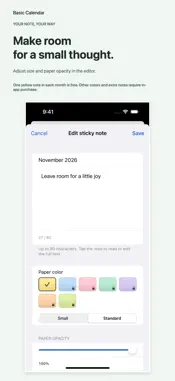
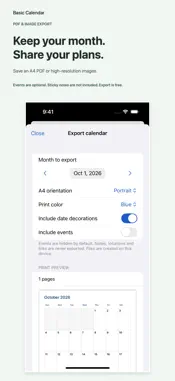
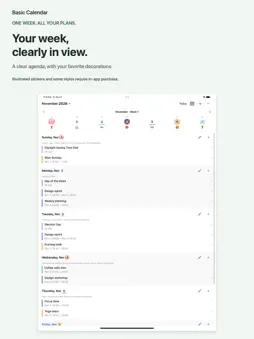
Your plans, with a personal touch. Basic Calendar brings your month, week, tasks and notes together. • Read your schedule your way Use monthly and weekly views, search event titles, locations and notes, and see time overlaps and events in progress. Calendar names and locations in daily/weekly lists are separate optional settings, both off by default. Location text stays in the list without opening maps or requesting device-location access. Choose a default duration for new event drafts. • Connect Apple Reminders View, add, edit and complete reminders for a selected date. Tap a reminder title to edit its title, date, time or list. Delete it from the editor after confirming removal from Apple Reminders. Connect explicitly and choose which reminder lists to display and use for new tasks. Full Reminders access is requested when you connect; notifications and account syncing remain managed by Apple Reminders and device settings. • Preview and personalize Try drawing, highlighters, emoji and illustrated stickers before saving. New decorations require the existing All Access Pass: an optional one-time, non-consumable purchase covering current and future decoration sets and Sticky Notes Plus. Eligible valid previous decoration or support purchases provide the same full access. Restore purchases is available in the app. There are no subscriptions. Existing saved decorations remain visible and can be kept or removed without purchase access. Availability and localized prices appear in the app. • Keep notes on your month Move, resize and tilt sticky notes, change paper opacity, and show them in large monthly widgets. One yellow note per month is free. All Access includes up to three notes per month and seven paper colors. Existing notes stay manageable when access changes, and notes merged through iCloud are preserved. Opacity is free. • Look back and export Explore monthly/yearly charts by scheduled duration, event count and stickers, and compare periods. These summarize calendar records, not actual activity or productivity. All-day events are excluded from duration totals; overlaps are added separately. Export A4 calendars as PDF or PNG. Events are off by default; locations, notes, links and sticky notes are excluded from exports. Lookback and export are free. • Useful on your devices Choose color themes, system/light/dark appearance, lunar dates and monthly widgets. Korean lunar dates support Gregorian dates from January 1, 1900 through December 31, 2050. On supported devices, on-device AI can turn a sentence into an event draft. It requires iOS 26 or later, compatible Apple Intelligence hardware and available settings, model and language. Review every draft before saving. Standard event creation remains available. No app account is required. Events require calendar access; event syncing follows device and calendar-service settings. Date decorations, sticky notes and Calendar Groups have separate optional iCloud sync switches. Sticky-note sync is off by default; turning it off keeps downloaded notes. Note content/appearance sync, while position/size stay on each device. Current calendar selection and custom lookback titles also stay on each device.
What's New
Version 1.1.9 2026-11-22
• See reminder counts on the monthly calendar and choose whether to use Apple Reminders. • Find overdue, incomplete reminders together in the Today list. • Save...• See reminder counts on the monthly calendar and choose whether to use Apple Reminders. • Find overdue, incomplete reminders together in the Today list. • Save calendar selections as Calendar Groups and switch between them from More. • A simpler header gives the month, Today and More controls more room, including at larger text sizes. • Fixed monthly events disappearing after returning to the app. • The More menu now keeps view switching and Calendar Groups at the top level, with Add and Tools submenus for other actions. Technical Analysis
Package Overview Basic metadata
Bundle ID
com.dotori.labs.BasicCalendar Current Version 1.1.9
Minimum iOS 17.0
Package Size App Store Size
Package Metadata 1 / 13 version records
5.0 / 5.0 (1 ratings)
Detailed binary, privacy manifest, framework, and Info.plist results have not been indexed for this package yet. The verified App Store and archive metadata above remains available.
Known Version Records
1 version record with stored package metadata • 13 known version records
Stored metadata does not guarantee a package is currently available to download.
| Details | Version / IDs | Version date | Action |
|---|---|---|---|
| 5.47 MB | v1.1.2 App Store ID: 884724500Build: 1.1.2 | 2026-04-21 00:21:51 | Get Version |
| Not archived | App Store ID: 879741994 | Unknown | Request Version |
| Not archived | App Store ID: 873195273 | Unknown | Request Version |
| Not archived | App Store ID: 869318906 | Unknown | Request Version |
| Not archived | App Store ID: 869191228 | Unknown | Request Version |
| Not archived | App Store ID: 868922701 | Unknown | Request Version |
| Not archived | App Store ID: 865434371 | Unknown | Request Version |
| Not archived | App Store ID: 860689904 | Unknown | Request Version |
| Not archived | App Store ID: 860407079 | Unknown | Request Version |
| Not archived | App Store ID: 860153542 | Unknown | Request Version |
| Not archived | App Store ID: 860068603 | Unknown | Request Version |
| Not archived | App Store ID: 860060126 | Unknown | Request Version |
| Not archived | App Store ID: 857751022 | Unknown | Request Version |