
Preview



Description
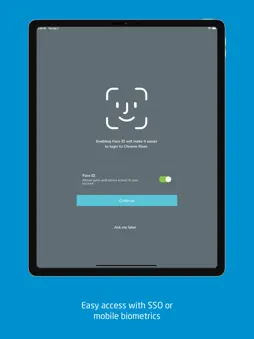
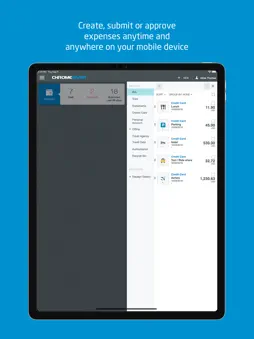
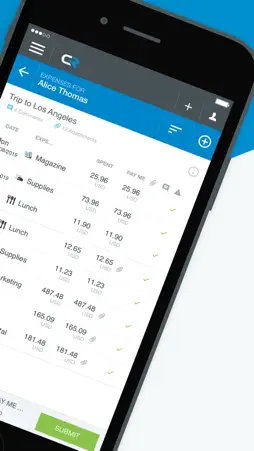
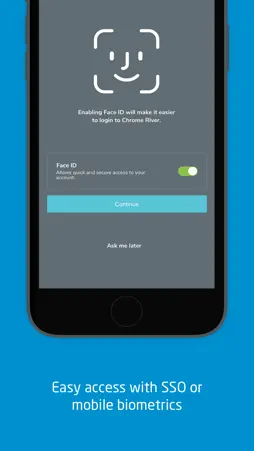
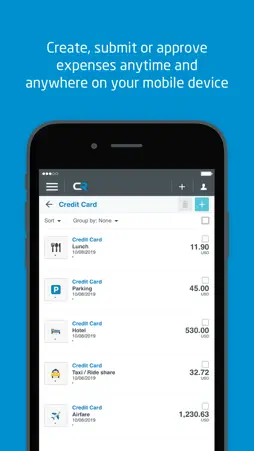
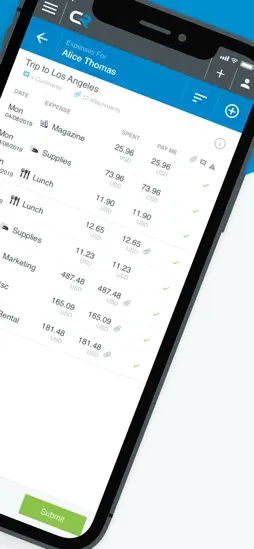
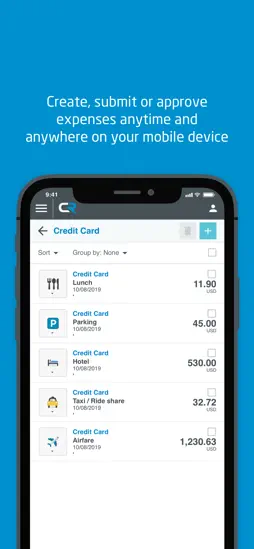
Chrome River provides highly-configurable cloud-based expense and invoice management solutions. Our suite of solutions offers a modern, elegant user experience to create, submit and approve expenses anywhere on any device. Now you can combine all the features of our solution with capabilities your mobile device provides, from biometrics to the camera, to easily access our web application. Because Chrome River is built with responsive design technology, you will always have a consistent user experience regardless of the device you are using. The Chrome River mobile app makes accessing the web application you know and love that much easier. This is an optional mobile application that can be downloaded to your personal device to help provide easier access to the Chrome River web app. We have made it easier for our users to access Chrome River on the go by allowing you to easily log in with biometric authentication or leverage single sign-on capabilities required by your organization. With Chrome River, you can: • Create, submit, and approve expense reports and invoices on-the-go • Capture and upload photos of your receipts with complete OCR functionality • Let business rules ensure expenses and invoices comply with spending policies. • Access your credit card data to quickly create expense reports. • Itemize expenses including hotel receipts with Chrome River FOLIO • Easily log in using single sign-on authentication (SSO) or enable mobile biometrics like touch and face identification for simplified access • Much more Learn more at www.chromeriver.com. Must be an existing Chrome River user. System requirements: Chrome River's mobile apps support the most current generation and the 1 prior generation of iOS devices.
What's New
Version 2.0.27 2025-10-30
• Maintenance Version 2.0.26 2025-10-03
• Maintenance Version 2.0.25 2025-03-10
• Maintenance Version 2.0.24 2024-07-01
• Maintenance Version 2.0.22 2024-04-03
• Bug Fixes Version 2.0.21 2024-03-11
• Bug Fixes Version 2.0.18 2023-11-28
• Improvement to minor cases for unlocking app • Fixed login issue when using webview • InTune ready for managed device use case (to be announced and enabled at...• Improvement to minor cases for unlocking app • Fixed login issue when using webview • InTune ready for managed device use case (to be announced and enabled at a separate time) Version 2.0.17 2023-07-07
• Fixed issue with some Microsoft/Azure SSO clients getting error screen during login • Fixed issue with Microsoft/Azure SSO clients compatibility with new mobi...• Fixed issue with some Microsoft/Azure SSO clients getting error screen during login • Fixed issue with Microsoft/Azure SSO clients compatibility with new mobile session • Rollout of new mobile session experience will begin for Microsoft/Azure SSO clients Version 2.0.16 2023-04-14
• User experience improvements for mobile session management • Biometric unlock • If your organization does not receive these features, please request your syst...• User experience improvements for mobile session management • Biometric unlock • If your organization does not receive these features, please request your system administrator to reach out to Support for more information on how it can be enabled for your organization. Version 2.0.15 2022-11-17
• Intune support for managed and co-managed devices that are enrolled with Intune or other MDM devices. • Note: This new Intune support requires your administra...• Intune support for managed and co-managed devices that are enrolled with Intune or other MDM devices. • Note: This new Intune support requires your administrator to contact Emburse Chrome River’s support team to enable. App Store User Reviews
Chrome River Master 42 2021-01-04
Overall Great App... Similar to the web version but harder to navigate
This app is great. It is a quick and easy way for employees with credit cards to upload receipts and create expense reports in the go, but it is the same as the...This app is great. It is a quick and easy way for employees with credit cards to upload receipts and create expense reports in the go, but it is the same as the web version and often is harder to navigate as there is less visibility. The only other downside along with visibility and navigation is the camera feature. Sometimes it takes a while for the picture/receipt to upload and attach to a credit card transaction. Also we have had issues where the allocation or job number does not populate when assigning a designated allocation to a specific transaction. All in all it works as needed.
Mikeclowry 2024-09-04
Career changer!!!
I never take the time to write detailed reviews, but after seeing this app only has 145 reviews and doesn’t have 100% satisfaction, I KNEW I needed to step in. ...I never take the time to write detailed reviews, but after seeing this app only has 145 reviews and doesn’t have 100% satisfaction, I KNEW I needed to step in. This app has helped me so much at my job in completing my expense reports for reimbursements that I just wanna go out and spend money for no reason now! Because I KNOW it’ll come back to me so quickly. If you use Chrome river for desktops, then you need to download this app ASAP! It has all the functionality of the desktop, and where I have to submit picture proof of my receipts, uploading them from my phone has been such a convenience. Where previously I would have to either email them to myself, OR use the chrome river “snap” app (which I am not a fan of). After using this app, I have deleted the “snap” app and no longer dread buying things to be reimbursed for them later. It’s all made so simple
JimD1212 2020-08-01
Horrible.
Horrible. Unable to perform the simplest of actions, e.g. adding a line item to a report, because the app either freezes, or drag-and-drop doesn’t function prop...Horrible. Unable to perform the simplest of actions, e.g. adding a line item to a report, because the app either freezes, or drag-and-drop doesn’t function properly, or you cannot select the checkboxes of individual line items, or...you get the point. When all of the fields for an expense are filled in, neither the Save NOR the Cancel buttons do anything — the app just stares blankly back at you, as if you have all day to enter 3 trivial expenses. If you press buttons in a sequence that it doesn’t expect, it balks at you, forcing you to close and reopen the app (which I’ve already done about 25 times in an hour, for just 2 reports with a mere handful of expenses that should have taken me 3 minutes each). Couple this with my complete inability to log into CR from ANY browser with my new, company-issued laptop using the SAME credentials as the iPad (whose login works just fine, but that’s the ONLY thing that works consistently), and all the ingredients are present for a train wreck in slow motion. As a former software engineer, I know when an app is a victim of poor testing, and this is definitely one of them. Save yourself the aggravation and switch to Concur.
Pnutbetr 2024-01-31
I cringe every time I need to tag an expense
The dropdown with list of options shifts slightly when I go to make a selection. The net result is a regularly make the wrong the selection because what I thin...The dropdown with list of options shifts slightly when I go to make a selection. The net result is a regularly make the wrong the selection because what I think I’m clicking on turns out to be something else. As opposed to a halo feature (where just using it brings me joy), this subtle issue is a horn feature because it brings me frustration and dread. Hopefully not a big thing to address…
JohnGageMN 2023-04-30
Buggy and poor UI
My employer switched to Emburse/Chrome River for expenses recently. After using the app for 1 week I have had numerous issues with the app locking up, losing re...My employer switched to Emburse/Chrome River for expenses recently. After using the app for 1 week I have had numerous issues with the app locking up, losing responsiveness, and having its graphics shift on the screen in such a way that you cannot utilize it properly. Every time this happens the only way to fix it is to force close the app and reopen it. In addition, the user interface for adding expenses to a report is clunky. Compared to put previous provider (Paylocity) there are 2-3x as many steps required to open an expense report and add a new expense to it. While the OCR pulling info from receipts to automatically full in fields is nice in theory, in practice I find it to make frequent errors that need to be corrected. The quantity of errors completely negates any advantage from having this option.
lilmissgr8ful 2019-12-12
User Friendly App
The CR app works just like the desktop version, very smooth and user friendly. Easy to navigate and continue doing business on a mobile device. Images come in...The CR app works just like the desktop version, very smooth and user friendly. Easy to navigate and continue doing business on a mobile device. Images come in clear zoom function works great. Only a few things could be improved for a quicker approving process, like placement of the open and image buttons (have to click on additional menu to view and select) which could be switched out for adjust button. But other than that it works great and I think it’s another great tool for our travelers to use on the go.
Kirstin O 2019-12-11
Just like the web version
The app is just like signing into the normal url in my browser, which is perfect because there aren’t any issues with that version! It just makes it more conven...The app is just like signing into the normal url in my browser, which is perfect because there aren’t any issues with that version! It just makes it more convenient to get to the application, which is a good enough reason for me to use it. It’s also nice that I can direct colleagues to the app since that is always everyone’s first question when they have to submit an expense report for the first time. Excellent job on the part of the app techs, who knew not to fix what wasn’t broken. Five stars.
D McDaniel 2020-11-12
As easy as desktop version
The Chrome River app gives you the same functionality as the desktop version when you are in the go! Want to quickly submit or approve expenses while waiting i...The Chrome River app gives you the same functionality as the desktop version when you are in the go! Want to quickly submit or approve expenses while waiting in line or between meetings? This app makes it a breeze to stay caught up when it’s convenient for you, and not just when you’re at your desk. We encourage all our users to download the app to make it faster and easier to get their expenses done.
Blue Skies Mallon 2020-10-27
CR Mobile Success
How much easier can you get? All the bells and whistles needed to keep up with you expenses on the go. This makes it so much quicker to create your expense re...How much easier can you get? All the bells and whistles needed to keep up with you expenses on the go. This makes it so much quicker to create your expense report in just a few clicks. As one who is constantly working on new innovations for my users...Chrome River gets an A+. Contact them to get your company started.
Little Wheato 2019-12-09
Love the App
The Chrome River app is awesome. You can create expense reports right from your phone which saves a ton of time instead of having to be at a computer. Receipts ...The Chrome River app is awesome. You can create expense reports right from your phone which saves a ton of time instead of having to be at a computer. Receipts are easy to upload and attach. I can track my expense so I know when I should be receiving reimbursement. Highly recommend the app to all users who travel!!!!
Technical Analysis
Package Overview Package analysis available
Bundle ID
com.chromeriver.native Current Version 2.0.27
Minimum iOS 12.4
Package Size App Store Size
Package Metadata 1 / 42 version records
hermes
dev.hermesengine.iphoneos v0.12.0iOS 13.4+4.51 MB
IntuneMAMSwift
com.microsoft.IntuneMAMSwift v19.4.0iOS 15.0+6.05 MB
IntuneMAMSwiftStub
com.microsoft.IntuneMAMSwiftStub v19.4.0iOS 15.0+109.75 KB
MSAL
com.microsoft.MSAL v2.5.0iOS 16.0+3.98 MB
Pendo
io.pendo.PendoSDKFramework v3.6.3iOS 11.0+6.19 MB
Related Apps


More by Emburse, Inc.


Developer Information
Known Version Records
1 version record with stored package metadata • 42 known version records
Stored metadata does not guarantee a package is currently available to download.
| Details | Version / IDs | Version date | Action |
|---|---|---|---|
 23.93 MB | v2.0.27 App Store ID: 879283169Build: 2007 | 2025-10-28 03:05:10 | Get Version |
| Not archived | v2.0.26 App Store ID: 878340040Build: 2.0.26 | 2025-10-03 20:19:21 | Request Version |
| Not archived | App Store ID: 872699019 | Unknown | Request Version |
| Not archived | v2.0.25 App Store ID: 872303846Build: 2.0.25 | 2025-03-10 22:58:54 | Request Version |
| Not archived | App Store ID: 867068085 | Unknown | Request Version |
| Not archived | v2.0.24 App Store ID: 866715138Build: 2.0.24 | 2024-07-01 22:55:09 | Request Version |
| Not archived | App Store ID: 864908702 | Unknown | Request Version |
| Not archived | v2.0.22 App Store ID: 864833340Build: 2.0.22 | 2024-04-03 22:42:47 | Request Version |
| Not archived | v2.0.21 App Store ID: 863719870Build: 2.0.21 | 2024-03-11 21:54:11 | Request Version |
| Not archived | v2.0.18 App Store ID: 861230899Build: 2.0.18 | 2023-11-28 04:55:12 | Request Version |
| Not archived | v2.0.17 App Store ID: 857144881Build: 2.0.17 | 2023-07-07 20:44:57 | Request Version |
| Not archived | v2.0.16 App Store ID: 856071360Build: 2.0.16 | 2023-04-14 18:16:54 | Request Version |
| Not archived | v2.0.15 App Store ID: 853400153Build: 2.0.15 | 2022-11-17 22:34:52 | Request Version |
| Not archived | App Store ID: 853216995 | Unknown | Request Version |
| Not archived | v2.0.14 App Store ID: 853214396Build: 2.0.14 | 2022-11-08 23:04:31 | Request Version |
| Not archived | v2.0.13 App Store ID: 852095783Build: 2.0.13 | 2022-10-31 23:13:32 | Request Version |
| Not archived | v2.0.11 App Store ID: 851321629Build: 2.0.11 | 2022-08-30 23:14:50 | Request Version |
| Not archived | v2.0.9 App Store ID: 850732255Build: 2.0.9 | 2022-07-11 23:27:00 | Request Version |
| Not archived | App Store ID: 850465666 | Unknown | Request Version |
| Not archived | v2.0.8 App Store ID: 850399514Build: 2.0.8 | 2022-06-29 19:04:02 | Request Version |
| Not archived | v2.0.7 App Store ID: 845639456Build: 2.0.7 | 2022-05-17 17:05:52 | Request Version |
| Not archived | App Store ID: 845150555 | Unknown | Request Version |
| Not archived | App Store ID: 845072315 | Unknown | Request Version |
| Not archived | App Store ID: 844387889 | Unknown | Request Version |
| Not archived | v2.0.4 App Store ID: 844230528Build: 2.0.4 | 2021-11-05 19:06:29 | Request Version |
| Not archived | v2.0.3 App Store ID: 843364205Build: 2.0.3 | 2021-08-04 00:23:53 | Request Version |
| Not archived | v2.0.2 App Store ID: 842069248Build: 2.0.2 | 2021-06-11 19:38:46 | Request Version |
| Not archived | App Store ID: 841122824 | Unknown | Request Version |
| Not archived | v2.0.1 App Store ID: 841107353Build: 2.0.1 | 2021-03-30 17:47:06 | Request Version |
| Not archived | App Store ID: 840819144 | Unknown | Request Version |
| Not archived | App Store ID: 840796744 | Unknown | Request Version |
| Not archived | v2.0.0 App Store ID: 840233302Build: 2.0.0 | 2021-03-11 19:15:01 | Request Version |
| Not archived | v1.6.3 App Store ID: 836183390Build: 1.6.3 | 2020-06-01 18:06:43 | Request Version |
| Not archived | v1.6.2 App Store ID: 835929930Build: 1.6.2 | 2020-05-13 23:44:31 | Request Version |
| Not archived | v1.6.1 App Store ID: 835830206Build: 1.6.1 | 2020-05-09 01:21:43 | Request Version |
| Not archived | App Store ID: 835202638 | Unknown | Request Version |
| Not archived | v1.5.5 App Store ID: 834942404Build: 1.5.5 | 2020-03-21 02:09:41 | Request Version |
| Not archived | App Store ID: 833971239 | Unknown | Request Version |
| Not archived | App Store ID: 833938314 | Unknown | Request Version |
| Not archived | App Store ID: 833921322 | Unknown | Request Version |