
Preview






Description
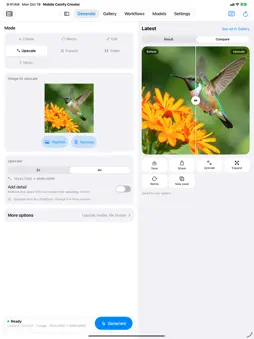
Mobile Comfy Creator is a native app for iPhone and iPad that runs ComfyUI and SwarmUI. Make images, video and music with the models on your own computer or a cloud GPU you rent: no generation credits to buy. FREE TO DOWNLOAD • Create, Remix and Edit images with any model on your ComfyUI or SwarmUI server, up to 4 images at a time • Save up to 2 ComfyUI servers, for example your computer at home and its remote address • Scan your Wi-Fi to find your server, or type an address. The app detects it, tests the connection and shows your GPU and models • A gallery with folders, favorites and search; Share and Save to Photos • Prompt help from Apple Intelligence, or Smart Templates that work with no AI model at all • Try Pro features free: your first 3 Pro generations are on us COMFYMOBILE PRO: ONE YEARLY SUBSCRIPTION • Video: Wan 2.2 (5B and 14B), HunyuanVideo 1.5 and LTX-Video, from text or from a photo • Music: songs and instrumentals with ACE-Step 1.5. Pick a style, add lyrics or go instrumental, up to 4 minutes • Upscale 2× or 4× with added detail, and Expand a photo past its edges to 16:9, 9:16 or square • Edit by describing the change with FLUX.1 Kontext or Qwen-Image-Edit, with up to two reference images • More than 4 images per run, the batch queue and one-tap seed variations • Workflow Steps with a live workflow diagram, plus your own workflow imports • Rent a cloud GPU on Vast.ai right from the app • iCloud sync of images, videos, workflows and settings across iPhone and iPad • Save more than 2 servers and switch between them in one tap If you used Mobile Comfy Creator before 2.0, or bought Pro before the subscription, you already have Pro. Your gallery, workflows and settings stay yours whether or not you subscribe, and exporting your workflows is always free. ComfyMobile Pro is an auto-renewing yearly subscription. Payment is charged to your Apple Account at confirmation of purchase. It renews automatically unless cancelled at least 24 hours before the end of the current period; manage or cancel it in your Apple Account settings. GPU rentals on Vast.ai are billed by Vast.ai to your own Vast.ai account. Terms of Use: https://www.apple.com/legal/internet-services/itunes/dev/stdeula/ Privacy Policy: https://gallahadd.com/legal/mobile-comfy-creator/privacy EVERY MODEL, SET UP FOR YOU • SDXL, Illustrious, Pony, SD 3.5, FLUX.1, FLUX.2, Chroma, Z-Image, Qwen-Image, HiDream and more • Split-file models are assembled automatically: text encoders and VAEs are found on your server • Each model says whether it's ready, or exactly which file it still needs, and whether your GPU or Mac can run it • Starting settings tuned for each model family, with Fast, Balanced and Best quality SIMPLE BY DEFAULT, POWERFUL WHEN YOU WANT IT • Pick a mode and a shape, type a prompt, tap Generate • More options: negative prompt, LoRAs, seed, number of images • Expert controls: CFG, steps, sampler, scheduler and custom sizes MADE FOR IPHONE AND IPAD • Widgets, Control Center controls and a Live Activity for generation progress • Larger text works: layouts rearrange instead of cutting off • On iPad: sidebar navigation and options in an inspector PRIVATE BY DESIGN • No tracking and no analytics. Your prompts and images go only to the servers you choose • iCloud sync is off until you turn it on, and uses your own iCloud account Requires your own ComfyUI or SwarmUI server (on your network, over Tailscale or on a rented cloud GPU). The app doesn't generate images on the phone itself. Music, Expand and some video models need ComfyUI. Terms of Use: https://gallahadd.com/legal/mobile-comfy-creator/terms Privacy Policy: https://gallahadd.com/legal/mobile-comfy-creator/privacy
What's New
Version 2.1.0 2026-11-25
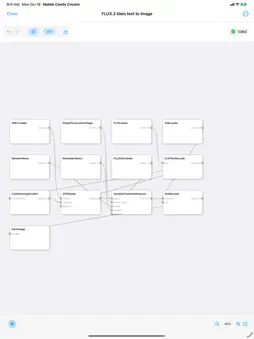
What's New in 2.1.0: • Workflow Steps & Live Diagram: Inspect, edit, and build ComfyUI workflows step by step with live server validation, type-safe connection...What's New in 2.1.0: • Workflow Steps & Live Diagram: Inspect, edit, and build ComfyUI workflows step by step with live server validation, type-safe connection pickers, insert/replace/remove steps, Undo/Redo, a 7-step starter recipe, and a pan/zoom workflow diagram (side by side on iPad and wide screens). • Desktop-Started Runs: Follow generations started on your ComfyUI desktop right from the app, see live progress, and view finished outputs. • Deeper Civitai & Hugging Face Integration: Smarter browsing, richer model details, opt-in Hugging Face search, and cleaner SwarmUI install paths. • ComfyUI Nodes 2.0 Compatibility: Full support for updated ComfyUI node schemas and widget formats. • Shortcuts & Spotlight: Wait for a finished image in Shortcuts on iOS 27+, Pro-gated Vast.ai GPU shortcuts showing running instances only, and optional Spotlight gallery indexing (off by default). • Vast.ai & Stability Fixes: Fixed Vast.ai GPU VRAM display (GB instead of raw MB), fixed URL query encoding in Vast.ai offer searches, and improved global cancellation and error messages. Technical Analysis
Package Overview Basic metadata
Bundle ID
com.brandonharvey.ComfyMobile Current Version 2.1.0
Minimum iOS 26.1
Package Size App Store Size
Package Metadata 2 / 5 version records
Detailed binary, privacy manifest, framework, and Info.plist results have not been indexed for this package yet. The verified App Store and archive metadata above remains available.
Developer Information
Known Version Records
2 version records with stored package metadata • 5 known version records
Stored metadata does not guarantee a package is currently available to download.
| Details | Version / IDs | Version date | Action |
|---|---|---|---|
| 21.63 MB | v1.5 App Store ID: 892021890Build: 1.5 | 2026-09-26 19:06:35 | Get Version |
| Not archived | App Store ID: 891649116 | Unknown | Request Version |
| 19.15 MB | v1.4 App Store ID: 884676677Build: 1.4 | 2026-04-19 22:33:17 | Get Version |
| Not archived | v1.3 App Store ID: 881685052Build: 1.3 | 2026-01-21 07:52:10 | Request Version |
| Not archived | v1.0 App Store ID: 878366825Build: 1.0 | 2025-09-24 21:16:20 | Request Version |