Preview



Description
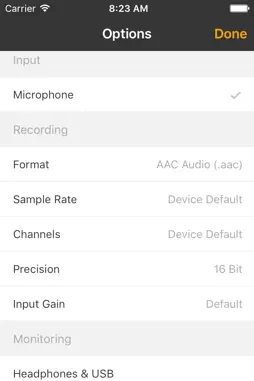
The Auphonic Recorder is a high-quality audio recorder with focus on ease of use, audio quality and stability. Record your raw microphone signals without any iOS pre-processing, in an uncompressed (PCM audio) or compressed (AAC) format, written to disk every moment to avoid data loss if the app gets killed. In combination with the integrated Auphonic web service, you can post-process, encode, tag and publish your podcasts, interviews, music recordings on the go with a single click. Our recording interface displays the current maximum peak level, you can add and edit chapter markers and it also records in background while using other apps. It is possible to record in PCM/AAC, stereo/mono, 16bit/24bit, at various samplerates, you can select the microphone, monitor the signal during recording with headphones and set the input gain. A simple editor shows the recorded waveform, where you can edit start/stop and chapter markers, export and process the audio file using the Auphonic web service or share it with other iOS apps. The app includes Share Sheet and Open In functionality, to import audio from other iOS apps and export it to Auphonic. Features of the Auphonic web service: • Encode your audio files in MP3, Opus, AAC/MP4, Ogg Vorbis, ALAC, FLAC, WAV and more • Metadata/tagging and chapter marks support for all file formats • Loudness Normalization to new broadcast standards: EBU R128, ATSC A/85, mobile audio and more • Intelligent Leveler: balances levels between speakers, music and speech – no compressor knowledge required • Automatic Noise and Hum Reduction: classifies regions with different backgrounds and automatically removes noise • Filtering of disturbing frequencies • Automatic Speech Recognition and Audio Search in over 80 languages • Publish your results automatically via YouTube, SoundCloud, Podlove Publisher, Spreaker, Libsyn, Blubrry, Archive.org, Dropbox, (S)FTP, HTTP, Google Drive, WebDAV, Amazon S3, etc. Please note that you need an Auphonic account to use our web service. All native recording, editing and sharing can be done completely offline without any account.
What's New
Version 1.2.1 2017-09-28
This app has been updated by Apple to display the Apple Watch app icon. - Support for Blueooth Playback and Monitoring - Bug fixes Version 1.2 2017-05-04
- monitor the audio signal during recording via headphones or USB - possibility to change the recording input gain - record at 44.1kHz, 48kHz or at the default ...- monitor the audio signal during recording via headphones or USB - possibility to change the recording input gain - record at 44.1kHz, 48kHz or at the default samplerate of your device - record with 24bit or 16bit precision Version 1.1 2016-11-24
- improved recorder interface (remaining disk space, format, etc.) - new recorder options - usability improvements when sharing audio between Auphonic and other...- improved recorder interface (remaining disk space, format, etc.) - new recorder options - usability improvements when sharing audio between Auphonic and other iOS apps - links to Auphonic productions/presets/services directly in app - better uploads to auphonic.com and notification fixes - possibility to force mono recordings - reworked waveform and marker interface - fixes with various external microphones - various bug fixes Version 1.0 2016-03-16
App Store User Reviews
River William 2018-06-04
FEATURE REQUEST
I love everything about your app, I would just appreciate it more if I could record two mono microphones at the same time in order to create a stereo audio file...I love everything about your app, I would just appreciate it more if I could record two mono microphones at the same time in order to create a stereo audio file. For example: The front iPhone mic would record onto the left channel while, at the same time, the back iPhone mic would record onto the right channel. Thanks and good luck!
Azarry 2017-03-18
Works great
Works great! However, if there is a way to rewind and fast forward through a file, I do not know it. I'm using Voiceover by the way. Also, I can't seem to reco...Works great! However, if there is a way to rewind and fast forward through a file, I do not know it. I'm using Voiceover by the way. Also, I can't seem to record using my bluetooth microphone. I'm using a Bose Quiet Comfort headset, and I am even unable to play sound back through those headphones unless I manually plug them in. Pleeeease fix this if possible. Thanks.
jackson1372 2017-06-02
Excellent balance of simplicity and flexibility
I'm an academic who records a lot of lectures/meetings, and this app has greatly improved my workflow. The implementation of chapter markers is especially well ...I'm an academic who records a lot of lectures/meetings, and this app has greatly improved my workflow. The implementation of chapter markers is especially well done/useful. The app is super snappy and doesn't have the lag that I've experienced on other recorder apps. I'm surprised it doesn't have more reviews!
ComputerGuy33 2023-12-29
PLEASE FIX BUG: Corrupted Audio Recordings
I would like to rate this app five stars, but my recordings keep getting corrupted. When the camera opens, someone calls me, someone FaceTime me, or I play a vi...I would like to rate this app five stars, but my recordings keep getting corrupted. When the camera opens, someone calls me, someone FaceTime me, or I play a video from photos. The recording recovery does not work either! Please fix this. I have had multiple important, long recordings become corrupted and unusable because of this.
Science Guy 2001 2019-03-28
Almost Great
This app is almost perfect for my needs. But the input gain reduction doesn’t work. I need to be able to control (reduce) the input level because my external mi...This app is almost perfect for my needs. But the input gain reduction doesn’t work. I need to be able to control (reduce) the input level because my external mic is loud and causes the recording to clip if I speak too loud. I’d be happy to pay for the app if everything worked.
zephyr707 2024-01-30
normalization?
i have been using auphonic to record aac and the waveform displays and the sound quality/levels are good in the app, but when i export the file it sounds very l...i have been using auphonic to record aac and the waveform displays and the sound quality/levels are good in the app, but when i export the file it sounds very low volume and the waveform is barely noticeable, what’s going on?
Technical Analysis
Package Overview Package analysis available
Bundle ID
com.auphonic.ios.recorder Current Version 1.2.1
Minimum iOS 9.0
Package Size Latest Recorded Package Size
Package Metadata 1 / 5 version records
VemedioAudioEngine
com.vemedio.ios.VemedioAudioEngine v1.0iOS 8.4+439.51 KB
VemedioDatabase
com.vemedio.ios.VemedioDatabase v1.0iOS 8.4+434.25 KB
VemedioKit
com.vemedio.VemedioKit v1.0iOS 8.4+504.16 KB
Related Apps


Developer Information
Known Version Records
1 version record with stored package metadata • 5 known version records
Stored metadata does not guarantee a package is currently available to download.
| Details | Version / IDs | Version date | Action |
|---|---|---|---|
 2.52 MB | v1.2.1 App Store ID: 841564144Build: 233 | 2021-04-18 06:33:32 | Get Version |
| Not archived | App Store ID: 823816270 | Unknown | Request Version |
| Not archived | App Store ID: 820146838 | Unknown | Request Version |
| Not archived | App Store ID: 819710313 | Unknown | Request Version |
| Not archived | App Store ID: 816377439 | Unknown | Request Version |