Preview




Description
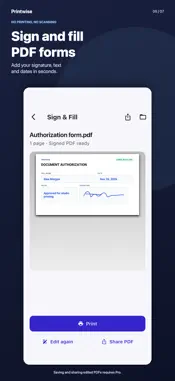
Print PDFs and photos, scan searchable documents, and check reported ink levels before printing. No ads. No account required. PRINT PHOTOS & DOCUMENTS • Photos from your library, several at once • PDFs, Word, Excel, PowerPoint, Pages, Numbers and Keynote files • Web pages converted into paginated PDFs you can preview before printing • Notes, text and anything you copied to the clipboard • From supported share menus: tap Share and choose Printwise for a file, photo or web link SEE YOUR PRINTER'S REAL STATUS • Live ink and toner levels when reported by your printer • Low-ink warnings before you hit Print • Alerts for paper jams, empty trays and open covers • Paper size loaded, color and two-sided support at a glance ONE-TAP PRINTING • Your printer is remembered — no picking it every time • Copies, color or black & white, Letter / A4 / Legal, portrait or landscape CHECK BEFORE YOU PRINT • Run real connection and IPP checks without sending a print job • Copy or share a printer diagnostic report • Review document size, reported paper, supply warnings and a PDF preview • Fit PDF pages to your chosen paper or keep original page sizes • Arrange photos 1, 2 or 4 per page PDF TOOLS • Merge PDFs and photos into one document • Split a PDF or extract a page range • Compress large PDFs and see the size before and after • Add or remove a password • Fill in forms and sign PDFs with your finger or Apple Pencil • Print several files at once in the order you choose POSTERS, ID COPIES & INK SAVING • Enlarge a photo across 4, 9 or 16 sheets with overlap and cut marks • Copy both sides of an ID card on one page; passport and standard photo sizes • Grayscale and ink saver modes; mirror printing for iron-on transfers • Page ranges, 2 or 4 pages per sheet, booklets and two-sided printing when your printer supports it SCAN TO PDF • Scan receipts, forms and contracts with automatic edge detection • Read text on your device and copy the recognized text • Create searchable PDFs and rotate or reorder scanned pages • Enhance, black & white and shadow-removal filters • Export recognized text as TXT or DOCX Recognition accuracy depends on image quality and language. Review extracted text for errors. KEEP A LOCAL PRINT HISTORY • View submitted jobs and their print settings • Optionally keep PDFs on your device for preview and reprinting • Delete individual entries or clear all history PDF storage is off by default. Up to 100 history entries are kept. "Sent" means submitted, not confirmed on paper. WORKS WITH YOUR PRINTER Printwise works with compatible AirPrint-enabled printers reachable on your local network. No drivers, no cables, no accounts. You can also add a printer by its IP address. Connection checks and a step-by-step guide help when your printer doesn't show up. Ink levels, alerts and available print options depend on what your printer reports. Document formatting may vary by file or website. Printwise is an independent app and is not affiliated with, or endorsed by, any printer manufacturer. PRINTWISE PRO Try Printwise with free prints first — no payment needed. Upgrade to Pro for unlimited printing, PDF sharing of scans and all features. With notification permission, Printwise can remind you the day before your trial ends. • Weekly subscription with a 3-day free trial for eligible new subscribers • Yearly subscription Current prices and trial eligibility are shown before purchase. Payment is charged to your Apple ID at confirmation of purchase (after the free trial, if one applies). Subscriptions renew automatically unless canceled at least 24 hours before the end of the current period. You can manage and cancel subscriptions in your Apple ID account settings. Terms of Use: https://www.apple.com/legal/internet-services/itunes/dev/stdeula/ Privacy Policy: https://kustasoft.com/uygulamalar/printwise-smart-printer-app/gizlilik-politikasi
What's New
Version 1.0.4 2026-11-27
New in this version: - Fresh, cleaner design across the app, in light and dark mode. - PDF tools: merge PDFs and photos, split or extract pages, compress, and a...New in this version: - Fresh, cleaner design across the app, in light and dark mode. - PDF tools: merge PDFs and photos, split or extract pages, compress, and add or remove a password. - Sign & fill: fill in forms, add your signature, text and dates to PDFs. - Print multiple files at once in the order you choose. - Poster printing: enlarge a photo across 4, 9 or 16 sheets with cut marks. - Ink saver, grayscale and mirror printing for iron-on transfers. - Print options: page ranges, 2 or 4 pages per sheet, booklets and two-sided printing on supported printers. - Job status from supported printers, and low-ink alerts. - Scan filters: enhance, black & white and shadow removal; export recognized text as TXT or DOCX. - ID copy, passport and photo sizes; on-device document summaries on supported devices. - Control Center and Lock Screen controls on iOS 18. - Now in Spanish, German, French and Portuguese. Technical Analysis
Package Overview Basic metadata
Bundle ID
com.kustasoft.printwise Current Version 1.0.4
Minimum iOS 17.0
Package Size App Store Size
Package Metadata 0 / 0 version records
Detailed binary, privacy manifest, framework, and Info.plist results have not been indexed for this package yet. The verified App Store and archive metadata above remains available.
Developer Information
Known Version Records
0 version records with stored package metadata
Stored metadata does not guarantee a package is currently available to download.
| Details | Version / IDs | Version date | Action |
|---|