Preview








Description
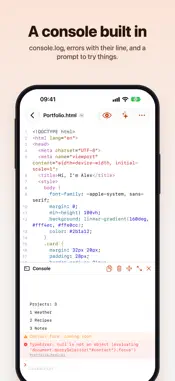
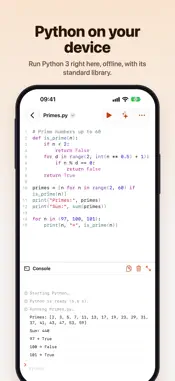
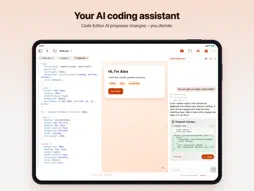
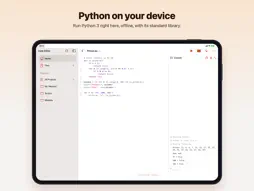
Write HTML, CSS, JavaScript and Python on iPhone, iPad and Mac – and see what your code does right away. Code Editor opens in an instant, with no account and no internet needed. For websites, scripts, homework, coding classes and every quick fix on the go. LIVE PREVIEW FOR WEB PAGES Your HTML page shows up as you type – below the code on iPhone, next to it on iPad and Mac. CSS, JavaScript and images from the project load along, just like on a real web server. Full screen preview with one tap. A CONSOLE BUILT IN console.log, warnings and errors with their line number appear right below the preview. Tap an error to jump to its line. Try out JavaScript and Python in the prompt, with a history like a terminal. CODE EDITOR AI (PRO) Built right in, no API key needed: ask “Give my page a dark mode” or “Why doesn't the button work?”, and Code Editor AI writes and changes code in your files and whole projects. Every change is a proposal with a highlighted diff – nothing is written until you apply it, and earlier states stay in the version history. Conversations are kept per project and file. Runs on models by Anthropic and OpenAI – or use your own API key from Anthropic, OpenAI or Google. RUN YOUR CODE • JavaScript runs right on your device • Python 3 with its standard library, offline (Pro) • print(), input() and error messages in the console 20+ LANGUAGES HTML, CSS, JavaScript, TypeScript, JSON, Markdown, Python, Swift, C, C++, Java, Kotlin, C#, Go, Rust, PHP, Ruby, SQL, YAML, XML and Shell – with syntax highlighting, line numbers and ⌘/ comments. MADE FOR TOUCH • Suggestions as you type for HTML, CSS, JavaScript and Python • A bar above the keyboard with Tab, symbols and building blocks for every language • Brackets, quotes and HTML tags close themselves • Find and replace, go to line, line wrapping on or off • Keyboard shortcuts for hardware keyboards WHOLE PROJECTS Every folder is a project: a file list, tabs, search across the project and go to file. Start with a ready-made website or an empty project, or open a folder from the Files app and iCloud Drive right where it is. A style sheet shows the page it styles, live. REAL FILES Everything is a plain file in the Files app. Edit files from other apps right where they are. Cards on the home screen show each file's first lines in color, with pins and sorting. ON THE MAC TOO With a menu bar, multiple windows and keyboard shortcuts – one subscription works on all your devices. CODE EDITOR PRO For when you want more – as a monthly or yearly subscription: • Code Editor AI with a monthly allowance • No ads • Run Python, offline • Import ZIP files and folders as projects, share projects as ZIP • iCloud sync between iPhone, iPad and Mac • Eight designs, from warm paper to deep black midnight • Widgets for the Home Screen and Lock Screen • Version history: bring back any earlier state • App lock with Face ID More AI: Pro + AI, Pro + AI Plus and Pro + AI Max include everything in Pro plus a much larger monthly AI allowance; AI Plus and AI Max can also use the Advanced model. Code Editor Pro and the AI plans are auto-renewing subscriptions, monthly or yearly; the AI allowance renews every month. Payment is charged to your Apple Account. The subscription renews automatically unless canceled at least 24 hours before the end of the current period. You can manage and cancel it anytime in your App Store account settings. Requests with your own API key are billed by that provider. Terms of Use: https://www.apple.com/legal/internet-services/itunes/dev/stdeula/ Privacy Policy: https://jlau.netlify.app/code-editor/privacy/ Code Editor is built by an independent developer. If you enjoy it, a rating means a lot!
What's New
Version 2.1 2026-11-26
New: Code Editor AI – an assistant that writes and changes code with you, right in your files and projects. It runs on models by Anthropic and OpenAI. • Every ...New: Code Editor AI – an assistant that writes and changes code with you, right in your files and projects. It runs on models by Anthropic and OpenAI. • Every change comes as a proposal with a preview – nothing is written until you apply it • Works across a whole project, with the website preview one tap away • Included in Code Editor Pro with a monthly allowance; Pro + AI, AI Plus and AI Max give you much more, and from AI Plus on an Advanced model • Your own Claude, OpenAI or Gemini key keeps working (Settings › AI Assistant) Also new: on iPhone, Back and the swipe from the edge in a project lead to its file list, a website's ⋯ menu has Preview, safer page previews and many small improvements. If you enjoy Code Editor, a rating helps a lot – thank you! Technical Analysis
Package Overview Basic metadata
Bundle ID
app.jl-html-editor.com Current Version 2.1
Minimum iOS 26.0
Package Size App Store Size
Package Metadata 1 / 4 version records
0.0 / 5.0 (0 ratings)
Detailed binary, privacy manifest, framework, and Info.plist results have not been indexed for this package yet. The verified App Store and archive metadata above remains available.
Developer Information
Known Version Records
1 version record with stored package metadata • 4 known version records
Stored metadata does not guarantee a package is currently available to download.
| Details | Version / IDs | Version date | Action |
|---|---|---|---|
| 6.58 MB | v1.1.0 App Store ID: 862734325Build: 1.1.0 | 2024-01-08 07:19:02 | Get Version |
| Not archived | App Store ID: 857247009 | Unknown | Request Version |
| Not archived | App Store ID: 856922674 | Unknown | Request Version |
| Not archived | App Store ID: 856863742 | Unknown | Request Version |