
Preview








Description
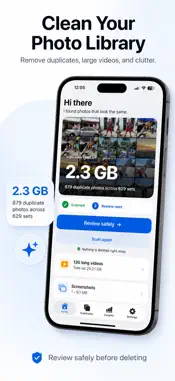
Find duplicate photos, choose the shots to keep, and reclaim storage without uploading your library. PicDeDupe analyzes photos privately on your device and keeps you in control before anything is removed. SMART DUPLICATE CLEANUP • Find duplicate and visually similar still photos. • Apple Vision verifies scan results on device for both Free and Pro. • Review recommended keepers using sharpness, exposure, visual quality, resolution, favorites, and your preferences. • Change the keeper before cleanup. • Choose Strict, Normal, or Loose matching sensitivity. • Videos, bursts, and Live Photos have separate cleanup screens. MORE WAYS TO RECLAIM SPACE • Review large videos sorted by size. • Review screenshots and burst sequences in focused cleanup screens. • Burst recommendations prioritize your picks and favorites, then assessed image quality. • Identify likely blurry photos among your most recent 300 photos. • Review Live Photos, with a clear reminder that deleting one removes both its still image and motion clip. • Review screen recordings, largest first. • Select screenshots and screen recordings older than 30 days, 6 months, or 1 year in one tap. • Shrink large videos without deleting them: Compress Videos re-encodes them on your device to 1080p HEVC and keeps their date, location, favorites, and albums. • Guided cleanup shows how much you can free and takes you from one cleanup to the next. • Track estimated storage savings and cleanup progress in Insights. EASY TO USE • A simple 3-step guide on Home: Scan, Review, Free space. • Text follows your iPhone's Text Size setting, with large touch targets and plain-language confirmations. • Cancel a scan at any time and see the time left. • Home Screen quick actions for scanning and common cleanups. PRIVATE BY DESIGN Duplicate comparison, Apple Vision verification, and keeper analysis run on your device. Your photos are not uploaded. No account is required, and the app contains no ads or third-party tracking SDKs. Cleanup summaries report the scan's counts and estimated savings. REVIEW BEFORE REMOVING You review the selected items before deletion, and Photos asks for confirmation. Deleted items move to Recently Deleted. With iCloud Photos enabled, deletion also syncs to iCloud and your other devices. Your storage goes down once Recently Deleted is emptied, and PicDeDupe shows you how, step by step. Storage estimates can differ from space immediately available on your device. FREE AND PRO Free includes one successful duplicate scan per day with the same Apple Vision verification as Pro, access to the three highest-value duplicate sets, and manual review. A scan with no duplicate groups does not use your daily allowance. PicDeDupe Pro adds: • Unlimited scans and every duplicate set • Smart Clean and bulk review • Advanced keeper preferences and explanations • More frequent background checks • Blurry and Live Photo cleanup • Video compression • Keeper recommendation export Pro is available through Weekly and Yearly auto-renewable subscriptions or a one-time Lifetime purchase. Subscriptions renew automatically unless canceled at least 24 hours before the current period ends. Manage or cancel them in your Apple Account subscription settings. Privacy Policy: https://plenguyen.com/picdedupe/privacy-policy Terms of Use (EULA): https://www.apple.com/legal/internet-services/itunes/dev/stdeula/
What's New
Version 1.1.3 2026-11-21
Easier to use, and more ways to free space. • Larger text: PicDeDupe now follows your iPhone's Text Size setting • A simple 3-step guide on Home: Scan, Review,...Easier to use, and more ways to free space. • Larger text: PicDeDupe now follows your iPhone's Text Size setting • A simple 3-step guide on Home: Scan, Review, Free space • Clear help for emptying Recently Deleted, so your storage actually goes down • New: Screen Recordings cleanup, largest first • New for Pro: Compress Videos — shrink large videos without deleting them • Select screenshots older than 30 days, 6 months, or 1 year in one tap • Cancel a scan at any time and see the time left • Home Screen quick actions for scanning and common cleanups Technical Analysis
Package Overview Basic metadata
Bundle ID
PicDeDupe--Smart--Photo--Cleaner Current Version 1.1.3
Minimum iOS 18.0
Package Size App Store Size
Package Metadata 2 / 12 version records
Detailed binary, privacy manifest, framework, and Info.plist results have not been indexed for this package yet. The verified App Store and archive metadata above remains available.
Developer Information
Known Version Records
2 version records with stored package metadata • 12 known version records
Stored metadata does not guarantee a package is currently available to download.
| Details | Version / IDs | Version date | Action |
|---|---|---|---|
| Not archived | App Store ID: 891838270 | Unknown | Request Version |
| Not archived | App Store ID: 890960574 | Unknown | Request Version |
| 6.25 MB | v1.1.0 App Store ID: 889636118Build: 1.1.0 | 2026-08-12 22:36:03 | Get Version |
| 6.16 MB | v1.1.0 App Store ID: 887889644Build: 1.1.0 | 2026-08-12 22:36:03 | Get Version |
| Not archived | v1.0.7 App Store ID: 886705066Build: 1.0.7 | 2026-06-09 18:40:37 | Request Version |
| Not archived | v1.0.6 App Store ID: 885380357Build: 1.0.6 | 2026-05-07 17:28:59 | Request Version |
| Not archived | v1.0.5 App Store ID: 885306148Build: 1.0.5 | 2026-05-06 11:28:20 | Request Version |
| Not archived | v1.0.4 App Store ID: 885276089Build: 1.0.4 | 2026-05-05 20:59:10 | Request Version |
| Not archived | v1.0.3 App Store ID: 885226161Build: 1.0.3 | 2026-05-04 21:01:34 | Request Version |
| Not archived | v1.0.2 App Store ID: 885182602Build: 1.0.2 | 2026-05-02 20:55:16 | Request Version |
| Not archived | v1.0.1 App Store ID: 885147250Build: 1.0.1 | 2026-05-01 18:18:33 | Request Version |
| Not archived | v1.0 App Store ID: 885083184Build: 1.0 | 2026-04-29 23:04:07 | Request Version |