Preview








Description
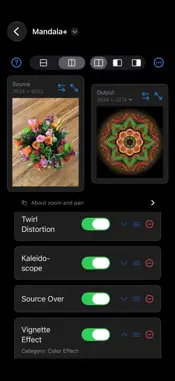
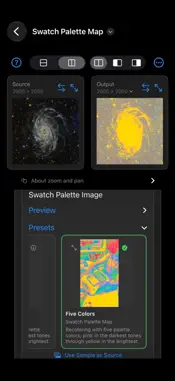
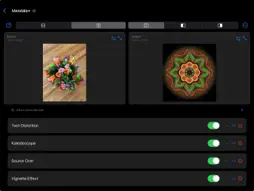
Filter Stack turns a photo into something new by stacking image filters, one on top of another, and showing you the result as you go. Choose a picture, add filters from a catalog of over 200, and arrange them in any order. Each filter works on the picture the one above it makes, so moving a filter up or down, or switching it off, changes the result, and you see why at once. Every filter keeps its settings while it's off or removed, so trying an idea never costs you the last one. A CATALOG TO EXPLORE Blurs, sharpening, color adjustments and color effects, blends and composites, stylized looks, halftones, tilings and kaleidoscopes, distortions, geometry, generators, gradients, transitions and reductions, in fifteen categories. Every filter has a short description and its own presets: choose one to load its settings, then make it your own. FILTERS OF ITS OWN Alongside the standard filters are about thirty made for Filter Stack, among them Swatch Palette Map, which recolors a picture from a set of weighted color swatches, and Escher Map and Complex Power Map, which wrap a picture into an endless spiral of itself. Zoom and pan inside the map and the spiral is computed afresh, not magnified. SETTINGS THAT FOLLOW YOUR PICTURE Sizes and positions, such as a blur's reach or an effect's center, are fitted to the picture you choose, so a filter looks much the same on a small photo as on a large one. Centers, corners and crops are placed by dragging them on a small copy of your picture. SEE HOW IT WORKS Many settings carry a note on what they do, with values worth trying. The mathematical filters, such as the convolutions, show their formulas. Help pictures every preset, so you can compare them before you choose, and its recipes build seven stacks step by step, from a pencil sketch to a mandala. DOCUMENTS THAT KEEP EVERYTHING Each Filter Stack document saves the picture, the stack and its order, every filter's settings and the images some filters use, and reopens as you left it. Documents are ordinary files, kept wherever you like, iCloud Drive included. MADE FOR LARGE PHOTOS Some stacks need a lot of memory. Filter Stack measures what each stack needs, and when one is too much for the device, it holds the stack back and offers a half-size copy of the picture. EXPORT Export the result, or the source and result together, as PNG, JPEG, HEIC or PDF. The free version exports at up to half size and shows an occasional ad on iPhone after exporting. Filter Stack Pro, a one-time purchase, exports at full size with no ads. Filter Stack runs on iPhone and iPad with iOS or iPadOS 16.4 or later, and on Mac with macOS 14.6 or later. A few filters need a newer system and appear only where they're available.
What's New
Version 1.1 2026-11-23
Place a picture where you want it - Composites such as Source Over gain Placement: put the picture in the center, in a corner, or beside, above or below its Bac...Place a picture where you want it - Composites such as Source Over gain Placement: put the picture in the center, in a corner, or beside, above or below its Background Image, or drag its outline. Placed beside, the result grows to hold both. Pickers you can zoom - Zoom into the picture behind a picker with a pinch or the zoom buttons, move around, and tap Fit to see it all again. - Perspective corners can now go outside the picture. - Snap puts corners and boxes on whole pixels. - Turn on Axes in a corner picker to see the x and y axes and the origin. - Type exact numbers for the corners with Hold Rendering: the shape is drawn as you type, then Render or Cancel. Better boxes and transforms - Crop and the other boxes gain Width and Height, a Shape menu that keeps proportions (Same as the Picture, 16:9 and more), and a Place menu. - Affine Transform, Affine Clamp and Affine Tile gain Scale about the center, linked or separate, and Move to Origin. - The Keystone Corrections' Focal Length now reaches 200, so photos taken zoomed in or cropped square up, and a new Print on a Wall preset shows each one at work. Fixes - Affine Transform shows the picture in the right shape from the start. - Tapping a corner without moving it no longer marks the document as edited. - When a picker's picture can't fit in memory, it says so and tries again after the next render. - Buying Filter Stack Pro raises exports to full size. - A new document no longer asks about earlier Mesh Generator settings it never had. - Circular Wrap's Ends Meet preset now closes the ring exactly on any picture. - An unchanged document is no longer saved again after every change. Help covers everything new. Technical Analysis
Package Overview Basic metadata
Bundle ID
com.limit-point.filter-stack Current Version 1.1
Minimum iOS 16.4
Package Size App Store Size
Package Metadata 0 / 0 version records
Detailed binary, privacy manifest, framework, and Info.plist results have not been indexed for this package yet. The verified App Store and archive metadata above remains available.
Developer Information
Known Version Records
0 version records with stored package metadata
Stored metadata does not guarantee a package is currently available to download.
| Details | Version / IDs | Version date | Action |
|---|