
Preview






Description
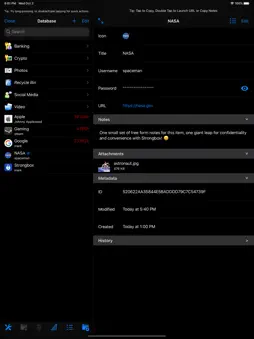
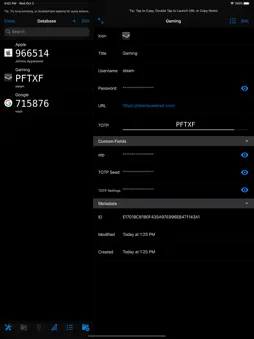
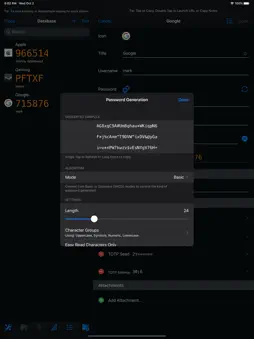
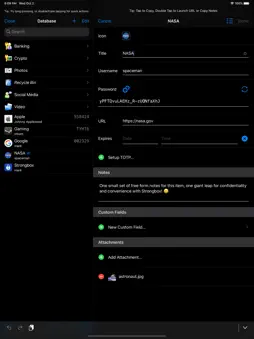
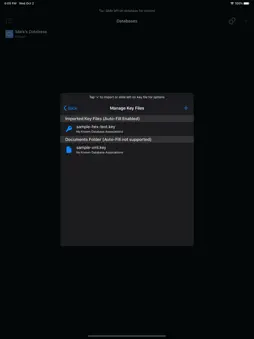
Strongbox is an application for keeping all your passwords safely stored and protected by one master password. Supporting the open source Password Safe and KeePass formats. *** Features *** - Face ID/Touch ID Unlock for the ultimate in convenience, security and speed. - Passkey support - The latest, most convenient and most secure authentication method (passkeys). - PIN Code Unlock with a Duress PIN option for those tricky situations. - YubiKey protection - secure your databases with a hardware token. - Secure - protected by time tested military grade cryptography. - Private - Isolated In-App attachments viewer for your sensitive documents, photos & videos. - Audit your passwords - Automatically check your database for weak password including a 'Have I Been Pwned?' check. - Cloud Support, so you can access your cloud safes using iCloud, Dropbox, OneDrive, Google Drive, WebDAV or SFTP even when offline. Use the built in Files app for many other storage options or store them securely only on your local device. You choose your storage. - Search your entire set of passwords and secrets instantly and powerfully, with deep search. Autocomplete new entries, and auto generate secure passwords. - Compatible - Import/Export by Files app, Email, CSV, iTunes File Sharing or use cloud storage. - Standards compliant - using the time tested Password Safe and KeePass formats so you can import any existing password safe you have. - Features galore - Incredibly configurable password generation including Diceware (XKCD) & regular passwords. - Timed Auto Clear Clipboard. - Entry History. - KeePass Field References, Tags, Custom Icon & FavIcons (including automatic search & download). - Two Factor Authentication codes (TOTP) - QR Code, Steam & Manual. *** Strongbox is Freemium *** This means that Strongbox is free with a basic feature set, but if you like there are enhanced Pro features too. You can opt-in to a 90 day Free Trial of all the Pro features if you like, no obligations, but most find the Free version perfectly adequate. --------------------------------------------------------------------- • Strongbox provides In-App Purchases (both auto renewable subscriptions and one-off non-consumable) for Pro versions of the App • An outright/upfront (i.e. non In-App Purchase) option exists also, please see the Strongbox website for details. • Subscriptions are auto renewable with recurring billing. Cancel anytime. • The time period of the subscriptions are monthly, 3-monthly or yearly at users discretion • The user can also choose to purchase a 'Lifetime' one-off Pro version of the App • Payment will be charged to iTunes Account at confirmation of purchase • Subscription automatically renews unless auto-renew is turned off at least 24-hours before the end of the current period • Account will be charged for renewal within 24-hours prior to the end of the current period, and identify the cost of the renewal • Subscriptions may be managed by the user and auto-renewal may be turned off by going to the user's Account Settings after purchase • Any unused portion of a free trial period, if offered, will be forfeited when the user purchases a subscription to that publication, where applicable • Strongbox Privacy Policy may be found here: https://strongboxsafe.com/privacy-policy/ • Strongbox Terms of Use may be found here: https://strongboxsafe.com/terms/
What's New
Version 1.65.2 2026-09-01
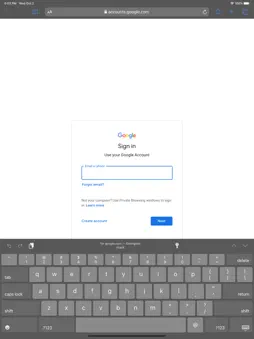
This update for Strongbox adds saving newly generated entries from Safari, adds experimental PRF Passkey support and more. New - Save new entries to Strongbox ...This update for Strongbox adds saving newly generated entries from Safari, adds experimental PRF Passkey support and more. New - Save new entries to Strongbox directly from Safari. - Sort entry lists by the date passwords were last changed. - Experimental support for PRF Passkeys. Fixes - Fixed an issue where some entries tapped in audit results would not open. - Improved resilience to WebDAV connection issues. - Fixed a crash when importing logins with multiple URLs. If you are enjoying the new version of Strongbox it would be great if you could leave a positive review for us in the App Store. It makes a huge difference to us as indie developers. Thank you! If you're experiencing any problems or are not happy, just let us know ([email protected]) and we'll make it right. The Strongbox Team Version 1.65.0 2026-07-13
This update for Strongbox adds SimpleLogin email aliases, Bitwarden Passkey import & big improvements to search. New: - Generate SimpleLogin email aliases ...This update for Strongbox adds SimpleLogin email aliases, Bitwarden Passkey import & big improvements to search. New: - Generate SimpleLogin email aliases right from the password generator. - Import Passkeys from Bitwarden. - Support for ID.me two-factor authentication setup. - Remember the last used search scope, and exclude password history from search results. - Multi-select actions for search results, including move, export, merge and delete. - Unified entry context menus, with a dedicated View action. - Refreshed app icon. Fixes: - Fixed searches containing straight or curly apostrophes. - Fixed favourite entries not opening correctly from the Home screen. - Fixed crashes when editing tags, including on iOS 18. - Fixed a crash when saving a Passkey without a username or email. - Fixed the What's New screen. - Fixed an issue where some subscription renewals could cause a temporary downgrade to non-Pro. - Fixed ineligible users seeing "90 days free" trial messaging. If you are enjoying the new version of Strongbox it would be great if you could leave a positive review for us in the App Store. It makes a huge difference to us as indie developers. Thank you! If you're experiencing any problems or are not happy, just let us know ([email protected]) and we'll make it right. - The Strongbox Team Version 1.64.1 2026-01-28
This update for Strongbox adds new import options, improves the upgrade experience & adds more options for crash reporting. New: - Import from Apple Passwo...This update for Strongbox adds new import options, improves the upgrade experience & adds more options for crash reporting. New: - Import from Apple Passwords exporter. - Import from mSecure and Secrets 4 vaults. - Updated upgrade/onboarding flow and trial messaging. - Added automatic opt-in crash reporting. Fixes: - Fix issue with search not pushing the item details in some cases - Improved split view controller stability (crashes, collapsing, toolbar issues, layout glitches). - Fixed Safari AutoFill lock reliability and YubiKey config mismatch. - Fixed Proton Pass importer reliability and WebDAV multi-user connections. - Improved HIBP audit logic and error tracking. - Fixed missing translations and credit card formatting/copy issues. If you are enjoying the new version of Strongbox it would be great if you could leave a positive review for us in the App Store. It makes a huge difference to us as Indie developers. Thank you! If you're experiencing any problems or are not happy, just let us know ([email protected]) and we'll make it right. - The Strongbox Team Version 1.64.0 2026-01-26
This update for Strongbox adds new import options, improves the upgrade experience & adds more options for crash reporting. New: - Import from Apple Passwo...This update for Strongbox adds new import options, improves the upgrade experience & adds more options for crash reporting. New: - Import from Apple Passwords exporter. - Import from mSecure and Secrets 4 vaults. - Updated upgrade/onboarding flow and trial messaging. - Added automatic opt-in crash reporting. Fixes: - Improved split view controller stability (crashes, collapsing, toolbar issues, layout glitches). - Fixed Safari AutoFill lock reliability and YubiKey config mismatch. - Fixed Proton Pass importer reliability and WebDAV multi-user connections. - Improved HIBP audit logic and error tracking. - Fixed missing translations and credit card formatting/copy issues. If you are enjoying the new version of Strongbox it would be great if you could leave a positive review for us in the App Store. It makes a huge difference to us as Indie developers. Thank you! If you're experiencing any problems or are not happy, just let us know ([email protected]) and we'll make it right. - The Strongbox Team Version 1.63.2 2025-11-21
This update for Strongbox supports importing from more password managers, and fixes a couple of issues with WebDAV and Dropbox hosted databases. - Strongbox no...This update for Strongbox supports importing from more password managers, and fixes a couple of issues with WebDAV and Dropbox hosted databases. - Strongbox now supports importing from Minimalist & ProtonPass - Adds the ability to tag credit card fields - Fixes a bug where concealable fields wouldn’t correctly conceal on save for credit card entries - Fixes various issues with the iPad experience of Strongbox - Fixes a crash when adding or opening a Dropbox Database if the account had large amounts of files - Fixes an issue stopping some users from connecting to their WebDAV databases - Updates text fields in the WebDAV entry to remove all autocorrection - Removes hyphens from credit card numbers when autofilling - Fixes a crash on iOS 18 and below If you are enjoying the new version of Strongbox it would be great if you could leave a positive review for us in the App Store. It makes a huge difference to us as Indie developers. Thank you! If you're experiencing any problems or are not happy, just let us know ([email protected]) and we'll make it right. - The Strongbox Team Version 1.63.1 2025-11-21
This update for Strongbox supports importing from more password managers, and fixes a couple of issues with WebDAV and Dropbox hosted databases. - Strongbox no...This update for Strongbox supports importing from more password managers, and fixes a couple of issues with WebDAV and Dropbox hosted databases. - Strongbox now supports importing from Minimalist & ProtonPass - Adds the ability to tag credit card fields - Fixes a bug where concealable fields wouldn’t correctly conceal on save for credit card entries - Fixes various issues with the iPad experience of Strongbox - Fixes a crash when adding or opening a Dropbox Database if the account had large amounts of files - Fixes an issue stopping some users from connecting to their WebDAV databases - Updates text fields in the WebDAV entry to remove all autocorrection - Removes hyphens from credit card numbers when autofilling If you are enjoying the new version of Strongbox it would be great if you could leave a positive review for us in the App Store. It makes a huge difference to us as Indie developers. Thank you! If you're experiencing any problems or are not happy, just let us know ([email protected]) and we'll make it right. - The Strongbox Team Version 1.63.0 2025-11-20
This update for Strongbox supports importing from more password managers, and fixes a couple of issues with WebDAV and Dropbox hosted databases. - Strongbox no...This update for Strongbox supports importing from more password managers, and fixes a couple of issues with WebDAV and Dropbox hosted databases. - Strongbox now supports importing from Minimalist & ProtonPass - Adds the ability to tag credit card fields - Fixes a bug where concealable fields wouldn’t correctly conceal on save for credit card entries - Fixes various issues with the iPad experience of Strongbox - Fixes a crash when adding or opening a Dropbox Database if the account had large amounts of files - Fixes an issue stopping some users from connecting to their WebDAV databases - Updates text fields in the WebDAV entry to remove all autocorrection - Removes hyphens from credit card numbers when autofilling If you are enjoying the new version of Strongbox it would be great if you could leave a positive review for us in the App Store. It makes a huge difference to us as Indie developers. Thank you! If you're experiencing any problems or are not happy, just let us know ([email protected]) and we'll make it right. - The Strongbox Team Version 1.62.3 2025-11-04
This update for Strongbox improves the experience with Credit Card entries, and fixes a couple of bugs. - Fixes a crash with iPadOS when transitioning from sma...This update for Strongbox improves the experience with Credit Card entries, and fixes a couple of bugs. - Fixes a crash with iPadOS when transitioning from small to large widths using multi tasking - Stops the auditor from causing large CPU usage when you have a large database - Fixes an issue where the Firefox/Chrome autofill password prompt would close itself - Corrects the text color in dark mode on iOS for credit card fields - Credit card custom fields can now be edited, and deleting them should persist If you are enjoying the new version of Strongbox it would be great if you could leave a positive review for us in the App Store. It makes a huge difference to us as Indie developers. Thank you! If you're experiencing any problems or are not happy, just let us know ([email protected]) and we'll make it right. - The Strongbox Team Version 1.62.2 2025-10-21
This update for Strongbox brings improvements to look & feel across iPadOS and macOS. - Fix issues with the third column on macOS - Stop the database window op...This update for Strongbox brings improvements to look & feel across iPadOS and macOS. - Fix issues with the third column on macOS - Stop the database window opening in the background - Fix a couple crashes on iPadOS - Adds a button to re-show the sidebar on iPadOS if you dismiss it and haven't selected an item - Stops the tab bar obscuring some buttons on iOS - Fixes some issues with touch targets at the top of lists - Stops the liquid glass buttons from showing a dark appearance when the homepage first loads If you are enjoying the new version of Strongbox it would be great if you could leave a positive review for us in the App Store. It makes a huge difference to us as Indie developers. Thank you! If you're experiencing any problems or are not happy, just let us know ([email protected]) and we'll make it right. - The Strongbox Team Version 1.62 2025-10-01
This update for Strongbox brings support for Liquid Glass, Credit Card entries, and more. - New Design to fit right into the new OS - Dedicated credit card ent...This update for Strongbox brings support for Liquid Glass, Credit Card entries, and more. - New Design to fit right into the new OS - Dedicated credit card entries - Fixes for autofill not working on some sites - Reduction in CPU usage when turning on auditing for large databases - Fixed a couple crashes - Fixed various issues with saving/deleting entries - Handled when FaceID fails due to another FaceID running by prompting another form of authentication - Allow the passkey section to collapse on iOS - Add better alerts when trying to delete entries/databases - Fix various authentication failures not telling you why they failed - Fix tags not being shown in the search list consistently If you are enjoying the new version of Strongbox it would be great if you could leave a positive review for us in the App Store. It makes a huge difference to us as Indie developers. Thank you! If you're experiencing any problems or are not happy, just let us know ([email protected]) and we'll make it right. - The Strongbox Team App Store User Reviews
eyv 2023-12-30
This is THE one!
TL;DR: a fantastic iOS password manager, better than Keepassium (when I last evaluated them side-by-side). Auto-sync, speedy even with large databases and with ...TL;DR: a fantastic iOS password manager, better than Keepassium (when I last evaluated them side-by-side). Auto-sync, speedy even with large databases and with a boatload of features including for us advanced users. The developers are extremely responsive and keep everything in good working order with frequent bug fix updates and new features. Earlier this year, I was looking to move away from 1Password and their online vaults. I ultimately decided on something KeePass-compatible. Within that category, Keepassium and Strongbox are basically the only serious contenders, and Strongbox is superior for several key reasons (details below). Deciding factors: Ultimately I chose Strongbox over Keepassium for two major reasons. 1. Strongbox is more memory-efficient. My database is almost 5M and Keepassium would sometimes run out of memory. Strongbox handles my library well: it’s speedy and responsive. 2. Merge sync! I modify my database on multiple devices on a daily basis and sync using iCloud. My understanding of Strongbox features is that, instead of uploading/downloading the entire database, Strongbox will only read/write the elements that have changed. This is an indispensable feature if you use multiple devices! I should also mention that both Strongbox and Keepassium are both excellent in the way they handle network disruption. Online or offline, things “just work”. Pro tip: use KeePassXC to migrate from your 1Password vault to a KeePass-compatible vault WITHOUT having to export all your 1Password stuff to an unencrypted format.
Steve.JB 2023-09-07
Best Password Manager - avoid a vendor lock-in with this app!
This app is the one I use the most on my iPad - my personal #1 app. A good password manager makes daily use so much easier and is essential for your own securit...This app is the one I use the most on my iPad - my personal #1 app. A good password manager makes daily use so much easier and is essential for your own security. I use it not only for passwords, but also for other sensitive information (e.g. ID data) that should not be stored unprotected. What makes this password manager stand out: - I don't know of any password manager with a better feature set (and I've tested many). - The product is actively supported. The developer takes suggestions for improvement and makes the app even better with each release. - There is no compulsion to use a vendor cloud solution. A cloud solution - however it is designed - always has the potential security risk of a design flaw or hack! That is not the case here. - The password database is stored using an open database format. There are open source solutions for access on any platform. So access / export of your own password database is always guaranteed. With many other proprietary solutions you have a vendor lock-in after a very short time, you cannot export your data. Migrating hundreds of passwords manually is not an option. If such a vendor would stop providing the service you would have a big problem - and we are not talking about loosing access to some cloud stored holiday pictures.
Alphaman64 2024-10-15
Best open option
This app is my go-to password app, even with Passwords from Apple now available. I’ve used the competitive products, too, spent weeks looking at and reviewing a...This app is my go-to password app, even with Passwords from Apple now available. I’ve used the competitive products, too, spent weeks looking at and reviewing alternatives, and what stands out for Strongbox is the cross-platform and cross-product support with very fair pricing. By using a standard database format, I can see my passwords and other protected data on every platform I have to use it on, even though I may use different apps (e.g., KeePass or KeePassXC) on others. I regularly use features like iCloud sharing, TOTP passwords, expiration dates, hardware keys, key files, virtual keys, secure notes, and more. The developer is incredibly responsive, even keeping the program updated during a new OS beta. For example, a change in Apple’s iPadOS and iOS in the most recent beta last Monday caused the apps to crash, and Mark had it fixed and pushed out through the App Store by the weekend. This is such a welcome change from so many other small (or even large) developers who wash their hands of betas and then take weeks after a new product update is rolled out before releasing a fix. If you’re looking for a good password app that doesn’t lock you in and has a responsive developer, you’d be hard pressed to do better.
SOE MITMFUSA 2020-04-16
If its not Tim Apple’s #1 passcode manager, it should be!
Having purchased my first Apple device (ipad mini5) in 2020, I was looking for a solid password manager to run my kdbx files. I narrowed it down to two choices:...Having purchased my first Apple device (ipad mini5) in 2020, I was looking for a solid password manager to run my kdbx files. I narrowed it down to two choices: Strongbox and Keepassium. Since they both offered free trials, I evaluated them side by side. Both developers are responsive professionals and both have created fine applications. Ultimately, I deleted Keepassium and chose to purchase a pro lifetime subscription to Strongbox. I am highly satisfied with Mark’s app. The deciding factor was simple: my eye preferred the sexy look and slick feel of Strongbox. It runs perfectly, it’s easy to use, and does exactly what I need it to do while maintaining bomb proof security. Even though it is more work, I choose to manually sync the database files with my Tresorit account. But Strongbox does feature auto-sync compatibility with other cloud storage companies if I change my mind. Thank you so much for creating (and maintaining) such a exceptional application! It is one of my all time favorites because it’s a solid and indispensable app for serious users.
Razzy128 2019-06-20
Best option for iOS
As a KeePass power user (over 900 entries), I am on the prowl for the most safe, user-friendly, and reliable KeePass app on iOS. Originally a MiniKeePass user,...As a KeePass power user (over 900 entries), I am on the prowl for the most safe, user-friendly, and reliable KeePass app on iOS. Originally a MiniKeePass user, it started to fail me when I was locked out of my own database because MiniKeePass did not support Argon2 encryption algorithm. Luckily, I searched on Reddit's /r/KeePass subreddit, and found StrongBox was on the list of official recommendations for iOS. Sure enough, not only did it support Argon2 encryption, but it offered a whole host of nitfy features that MiniKeePass lacked, such as FaceID unlock (humongous game-changer in saving time from punching in passwords), easily visible TOTP token keys that you can copy & paste, and also Favicons that are preserved. I cannot express how impressed I am with StrongBox, it's the level of functionality and features that reminds me of Android's KeePass2Android, but even superior. Do yourself a favor and grab the Pro version, and support this wonderful developer! Being open-sourced, vetted, and safe is important to me, and StrongBox checks all these boxes. I would highly recommend to my family and friends.
overit17233 2020-12-22
Hands down the #1 KeePass password manager!
I switched from MiniKeePass to Strongbox when MiniKeePass was removed from iOS. The transition was simple since all I had to do was import my database and I was...I switched from MiniKeePass to Strongbox when MiniKeePass was removed from iOS. The transition was simple since all I had to do was import my database and I was up and running. Right away I knew I should have been on Stongbox a long time ago. This app is the best keepass app out there. It’s clean and super intuitive . I installed the OS X version on my MBP as well. Even though I do not use iCloud for my database storage, it is still great to have that as an option. This helps the user experience be seamless for Apple users. Using the pro features has been a game changer! Being able to open the app with FaceId on the phone and use my AppleWatch to authenticate on my MBP, has 100% helped my workflow. I try and have long, unique, and secure passwords. Strongbox allows me to quickly access and copy my data. I love the auto favicon download feature too. It’s the little things. If your like me and you’re a keepass person, I cannot recommend both the iOS and OSX apps of Strongbox.
Stvwlf 2019-08-31
Excellent IOS app for KeePass database
I used MiniKeePass in conjunction with Dropbox to use my desktop KeePass database on IOS devices. While MiniKeePass always worked, it was a manual process to ...I used MiniKeePass in conjunction with Dropbox to use my desktop KeePass database on IOS devices. While MiniKeePass always worked, it was a manual process to up load an updated database version from DropBox to MiniKeePass. And the app’s interface, while workable, was pretty basic. Not to mention typing in that long KeePass db password every few minutes when I needed extended access. Recently I read about Strongbox on Ghacks. I decided to trial it. The app offers a generous 90 days trial of its pro version. I found what to me is a very polished interface. Optionally, the app allows replacing typing in the KeePass password with a PIN. Plus allows requiring PIN or touch each time the app is opened. And allows a different PIN on the database from accessing the app PIN. I have it configured to access the db on Dropbox, and it automatically checks Dropbox for the latest version of db file on opening the database. No more manually updating db when it’s changed. I had one issue. When trying to auto fill login forms, it kept looping back to opening the database. I couldn’t do auto fill. I emailed app support and received a reply from Mark the developer within 15 minutes. I learned from Mark due to IOS imposed memory limits, sometimes larger db files get into this looping problem. I discovered a desktop KeePass setting to purge old KeePass history records, which cut in half the size of my database, which resolved the auto fill issue. The app works great, is very well done, and getting a support reply from the developer directly in only a few minutes was very reassuring. I chose to support development on the app and signed up for the $10 yearly app subscription. This app makes working with KeePass on IOS pretty much as simple as using Keychain. Plus Keychain, each time, offers to add Strongbox logins I use into Keychain, if I want to. I think the developer’s done an excellent job!
DMT5217 2020-03-07
So far, so good! March 7, 2020 update
Been using Strongbox now for a couple of months. I love that I can control my own password file. I don’t trust the other password managers, especially ones th...Been using Strongbox now for a couple of months. I love that I can control my own password file. I don’t trust the other password managers, especially ones that are run by large corporations/venture capital companies. You just never know what they’re going to do with your data. Strongbox works great - it’s easy to use & has robust features - it’s exactly what I needed! So I decided to purchase the Pro lifetime version. Appreciate all the work you do Mark and I’m happy to help support you/your work. Thanks. I’ve been using Strongbox now for about a week and I like it a lot! I did have to manually input my passwords, but that was because I didn’t want to create a CSV in another app in order to import. On the plus side, I used Strongbox pw generator to create new passwords and updated almost every one of them as I created my database. So now I know I have strong, random passwords for all my accounts! I have about 100 accounts and it took probably about 8 hours spread out over several days. Tedious? Yes. Beneficial and worth it? Definitely!! It’s great to have access to all my info on my iPad & iPhone. I did not have all my pws on my iOS devices because I didn’t want to do that for security reasons. I also did not want to store my password database the providers servers - love that I can control where I want to store it. I think Strongbox is more secure than Keychain and is a great solution. I’ll update or post again after using the app for a while longer. Thanks Mark
CosmicFalls 2021-09-14
Strongbox is just so good. Leaps and bounds above the rest, easily worth it for lifetime.
I have a lot of miles on this app and can’t emphasize it enough: this is the best password manager I have ever used. And I've used a lot of them — none of them ...I have a lot of miles on this app and can’t emphasize it enough: this is the best password manager I have ever used. And I've used a lot of them — none of them came close to this app. None of Bitwarden, 1password, 10+ ‘kee’ apps, MS/Google auth, etc. could compare to the functionality you get from strongbox. The pass generator is the best of them all, and backing up is super easy. The membership is worth more than it charges, it’s such an important app for me. I can’t wait for a PC release of this. Don’t hesitate on it, just try the free version and see how it is (make sure you turn the auto fill on in iPhone settings). A feature I’d like to see is an easier way to organize entries with an active TOTP. I made a 2nd database for TOTP accounts because of my difficulty finding them when they’re mixed up with non-TOTP entries. And (might be a bug) it doesn’t seem possible to custom sort them in the ‘totp list’ format. *To add to that, if the totp list could be more like a grid (with 2/3 on each ‘row’) it would be way quicker to get to. Considering some expire quickly it can be an issue having to scroll through a long list of individual entries. Thanks for the amazing password manager! Serious props to the dev, you made a really great program. It’s the most important app on my phone, without a doubt.
RobA1701 2025-11-20
Great for Apple Users All-Around
I’ve used many password managers over the years. Lastpass, 1Password, Dashlane, and Bitwarden. After abandoning my Windows PC for a MacBook Pro, I was unhappy w...I’ve used many password managers over the years. Lastpass, 1Password, Dashlane, and Bitwarden. After abandoning my Windows PC for a MacBook Pro, I was unhappy with the lack of of true integration with iOS and macOS applications. Bitwarden has promised integration with macOS, but it is slow in coming. I found Strongbox on Reddit and decided to give it a shot. I’m very pleased with the usability and functionality. It works just like the integrated Passwords app and reduces the number of taps/clicks to login vs Bitwarden and others. It has all the features I could want. The only thing I would love to see added is the ability to create my own templates for storing information. Currently, you have logins and credit cards. I have more record types I would like to create with their own custom fields. I am hoping Strongbox will add this functionality in the future. For now, I am happy to use the Login record and just add additional fields to it that I need. Well done! 🥳
Technical Analysis
Package Overview Package analysis available
Bundle ID
com.markmcguill.strongbox Current Version 1.65.2
Minimum iOS 15.0
Package Size App Store Size
Package Metadata 4 / 336 version records
MSAL
com.microsoft.MSAL v1.6.3iOS 14.0+3.7 MB
4.7 / 5.0 (4,027 ratings)
Related Apps


More by Phoebe Code Limited


Developer Information
Known Version Records
4 version records with stored package metadata • 336 known version records
Stored metadata does not guarantee a package is currently available to download.
| Details | Version / IDs | Version date | Action |
|---|---|---|---|
 144.96 MB | v1.65.2 App Store ID: 889614779Build: 1.65.2 | 2026-09-01 15:52:29 | Get Version |
| 144.96 MB | v1.65.2 App Store ID: 888126868Build: 1.65.2 | 2026-09-01 15:52:29 | Get Version |
| 82.65 MB | v1.64.1 App Store ID: 881895175Build: 25 | 2026-01-27 16:05:48 | Get Version |
| Not archived | v1.64.0 App Store ID: 881428656Build: 1.64.0 | 2026-01-26 12:35:02 | Request Version |
| Not archived | v1.63.2 App Store ID: 879982113Build: 1.63.2 | 2025-11-21 20:21:41 | Request Version |
| Not archived | v1.63.1 App Store ID: 879945100Build: 1.63.1 | 2025-11-21 14:22:05 | Request Version |
| Not archived | v1.63.0 App Store ID: 879583502Build: 1.63.0 | 2025-11-20 11:17:44 | Request Version |
| Not archived | v1.62.3 App Store ID: 879400988Build: 1.62.3 | 2025-11-04 12:02:03 | Request Version |
| Not archived | v1.62.2 App Store ID: 879066649Build: 1.62.2 | 2025-10-21 18:01:55 | Request Version |
| Not archived | v1.62 App Store ID: 878530069Build: 1.62 | 2025-10-01 20:50:47 | Request Version |
| Not archived | v1.61 App Store ID: 875114756Build: 1.61 | 2025-05-29 15:51:22 | Request Version |
| Not archived | v1.60.40 App Store ID: 874744286Build: 1.60.40 | 2025-05-20 13:23:13 | Request Version |
| Not archived | App Store ID: 874624020 | Unknown | Request Version |
| Not archived | v1.60.39 App Store ID: 874553740Build: 1.60.39 | 2025-05-12 11:12:55 | Request Version |
| Not archived | v1.60.37 App Store ID: 874365250Build: 1.60.37 | 2025-04-30 14:28:38 | Request Version |
| Not archived | v1.60.36 App Store ID: 873494681Build: 1.60.36 | 2025-03-27 16:27:54 | Request Version |
| Not archived | v1.60.35 App Store ID: 872720708Build: 1.60.35 | 2025-02-23 08:06:51 | Request Version |
| 56.78 MB | v1.60.34 App Store ID: 872536442Build: 5256 | 2025-02-18 03:49:40 | Get Version |
| Not archived | v1.60.33 App Store ID: 872230772Build: 1.60.33 | 2025-02-12 04:57:23 | Request Version |
| Not archived | v1.60.32 App Store ID: 871639003Build: 1.60.32 | 2025-01-10 04:53:29 | Request Version |
| Not archived | v1.60.31 App Store ID: 871515584Build: 1.60.31 | 2025-01-04 05:34:35 | Request Version |
| Not archived | v1.60.30 App Store ID: 871192750Build: 1.60.30 | 2025-01-01 03:34:18 | Request Version |
| Not archived | v1.60.26 App Store ID: 870799324Build: 1.60.26 | 2024-12-01 20:35:34 | Request Version |
| Not archived | v1.60.25 App Store ID: 870644209Build: 1.60.25 | 2024-11-27 09:20:35 | Request Version |
| Not archived | v1.60.24 App Store ID: 870479416Build: 1.60.24 | 2024-11-18 09:04:23 | Request Version |
| Not archived | v1.60.23 App Store ID: 869977314Build: 1.60.23 | 2024-10-29 08:50:48 | Request Version |
| Not archived | App Store ID: 869692634 | Unknown | Request Version |
| Not archived | App Store ID: 869683839 | Unknown | Request Version |
| Not archived | App Store ID: 869005875 | Unknown | Request Version |
| Not archived | App Store ID: 868923988 | Unknown | Request Version |
| Not archived | App Store ID: 868490671 | Unknown | Request Version |
| Not archived | App Store ID: 868315327 | Unknown | Request Version |
| Not archived | App Store ID: 868150676 | Unknown | Request Version |
| Not archived | App Store ID: 868116799 | Unknown | Request Version |
| Not archived | App Store ID: 868100496 | Unknown | Request Version |
| Not archived | App Store ID: 868063305 | Unknown | Request Version |
| Not archived | App Store ID: 868017720 | Unknown | Request Version |
| Not archived | App Store ID: 867829889 | Unknown | Request Version |
| Not archived | App Store ID: 867641092 | Unknown | Request Version |
| Not archived | App Store ID: 867544327 | Unknown | Request Version |