Preview



Description
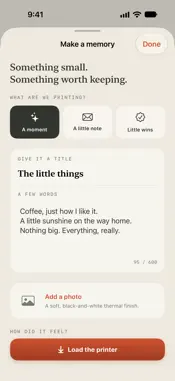
Some things are too small for a photo album, and too lovely to forget. The coffee that tasted just right. A note from someone you love. A little win on a very ordinary day. TinyPrint turns those moments into beautiful thermal-style receipts. Add a photograph, a few words, a date, and a feeling. Choose your paper, press the orange button, and watch your memory roll out. A TINY PRINTER, FULL OF FEELING Enjoy a tactile paper-feed animation, gentle haptics, and original mechanical printer sounds. Pull your print to tear it off, or use the Tear button. Memories you create are saved as soon as printing starts. Try a sample first and keep it if you’d like. The printer starts with a short blank paper edge. Load a memory when you are ready; its ticket appears when you press PRINT. Tap Preview beside Load the printer to see how your receipt will look. THREE WAYS TO KEEP A MOMENT Capture an everyday moment, write a little note, or celebrate your small wins. Choose cream, blush, or sage paper. Selected photos get a soft black-and-white thermal finish. YOUR OWN LITTLE COLLECTION Browse, search, favourite, and revisit your prints. Your draft is kept between visits, so you can finish when the words arrive. MADE TO BE SHARED Share a full-length, high-resolution image of your print with the system share sheet. Send a note to someone, save an image to Photos, or keep it just for yourself. AT HOME ON IPHONE DUO Set iPhone Duo down partially open in portrait. Tap Print on the lower half and watch the receipt feed through the fold. Pull the paper to curl and tear it, or tap the orange Tear button. It also works on other supported iPhones and iPad. PRIVATE BY DESIGN No account. No advertising. No tracking or analytics. Your memories stay in the app on your device unless you choose to share them. Keep the little things.
What's New
Version 1.2 2026-11-28
Try a sample receipt and choose whether to keep it. Preview your receipt beside Load the printer. On iPhone Duo, see the loaded memory’s title before printing, ...Try a sample receipt and choose whether to keep it. Preview your receipt beside Load the printer. On iPhone Duo, see the loaded memory’s title before printing, then tap Share print after you tear off the receipt. Saved prints can now be printed again or edited as a copy. Technical Analysis
Package Overview Basic metadata
Bundle ID
com.wearmoondrop.tinyprint Current Version 1.2
Minimum iOS 18.0
Package Size App Store Size
Package Metadata 0 / 0 version records
Detailed binary, privacy manifest, framework, and Info.plist results have not been indexed for this package yet. The verified App Store and archive metadata above remains available.
Known Version Records
0 version records with stored package metadata
Stored metadata does not guarantee a package is currently available to download.
| Details | Version / IDs | Version date | Action |
|---|