Preview









Description
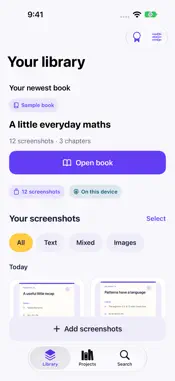
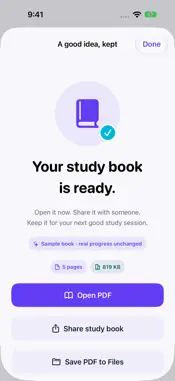
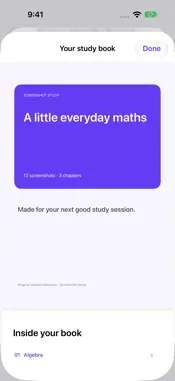
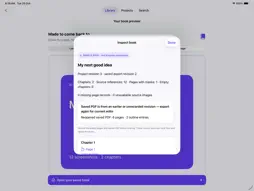
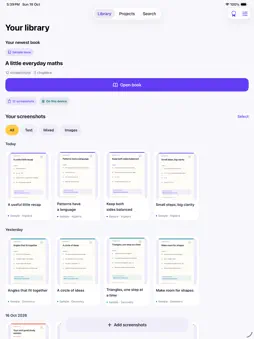
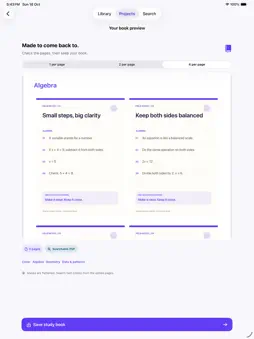
Turn selected screenshots into a study book with chapters, annotations and edited pages. Inspect the book before and after export: see its source-page inventory, missing files, mask count and revision, then reopen the saved PDF to check its actual page and outline counts. Editing a page leaves an earlier PDF clearly labelled as an earlier revision until you export again. Screenshot Study brings your saved images, reading notes and useful ideas into a bright, organised workspace on iPhone and iPad. Collect a few pages, give them chapters, mark what matters and make a finished PDF. COLLECT YOUR MATERIAL Choose images from Photos or Files, or ask the app to find recent screenshots you have allowed it to access. Browse by date and filter text-heavy, mixed or image pages. Import up to 40 images per batch; repeat a gallery scan to collect older screenshots. MAKE SENSE OF YOUR SCREENSHOTS Create books with a title and cover colour. Add and rename chapters, move pages with drag and drop or accessible move controls, and keep a clear view of what you have collected, organised, reviewed and exported. Review is optional. READ, ANNOTATE AND PROTECT Extract English text on your device, correct recognition errors, highlight passages, draw with a finger or Apple Pencil, crop and rotate pages, and add private notes. Apply opaque masks to hide regions before exporting. Exported pages contain flattened masks, and masked text is excluded from searchable PDF, plain text and Markdown output. Originals remain in the app for reversible editing until you delete them. BUILD A BOOK WORTH KEEPING Preview one, two or four screenshots per page. Create a PDF with a cover, contents pages and chapter bookmarks. Open your finished book, save a separate copy to Files, share it with another app or print with a compatible AirPrint printer. Text and Markdown companions make visible text useful elsewhere. OPTIONAL ON-DEVICE CHAPTER SUGGESTIONS On supported devices with Apple Intelligence available, ask for chapter suggestions from visible text. Review the proposal before applying it. Availability depends on your device, system version and model readiness; manual organisation always works. A STUDIO THAT FEELS LIKE YOU Light and dark appearance, adjustable motion, optional original sounds and supported-device haptics make everyday progress feel satisfying. Three milestones celebrate useful work without streaks, pressure or locked essential tools. START WITH SOMETHING REAL A skippable capture-to-book guide explains importing, organising, masking, PDF creation, saving, sharing and printing. Try an original sample collection before importing your own material. Sample milestones stay separate from your own progress. YOUR PRIVATE ICLOUD STUDIO Personal screenshots, original images, edits, notes, chapters and milestones sync through your private iCloud account to devices using the same Apple Account. Work offline and check Project sync for pending changes. Samples and preferences stay on each device; create a PDF on either device or save a separate copy to Files. iCloud access and available storage are required for sync. No separate app account is needed. Text recognition and supported on-device suggestions happen locally. This version has no connected cloud AI, advertising or in-app purchases. Masks protect exports; original images remain in your private workspace for reversible editing. Import supports image files; arbitrary PDFs and project files from other apps are not supported. English text recognition. iPhone and iPad with iOS/iPadOS 18 or later. Apple Intelligence suggestions require a compatible device and supported system configuration. Apple Pencil and printing require compatible hardware.
Technical Analysis
Package Overview Basic metadata
Bundle ID
in.bighelpers.screenshotstudy Current Version 1.0
Minimum iOS 18.0
Package Size App Store Size
Package Metadata 0 / 0 version records
Detailed binary, privacy manifest, framework, and Info.plist results have not been indexed for this package yet. The verified App Store and archive metadata above remains available.
Developer Information
Known Version Records
0 version records with stored package metadata
Stored metadata does not guarantee a package is currently available to download.
| Details | Version / IDs | Version date | Action |
|---|