
Preview






Description
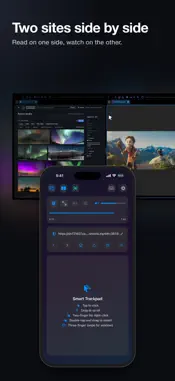
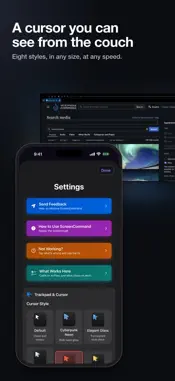
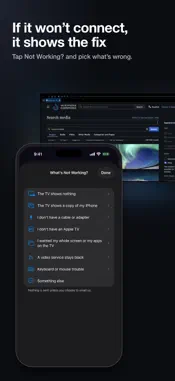
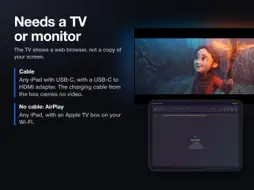
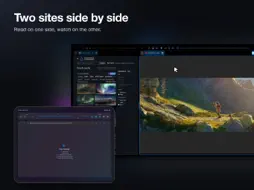
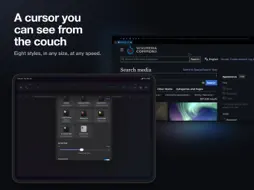
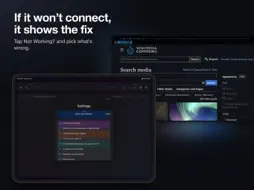
A full desktop browser on your TV or monitor, with your iPad or iPhone as the trackpad and keyboard. Netflix, Prime Video and other streaming services play over a cable. No computer needed. Pay once, no subscription. NEEDS AN EXTERNAL MONITOR OR TV. ScreenCommand's own browser fills the TV at its full resolution, with no black bars. It isn't a copy of your screen, and other apps can't run on the TV. Without a display, the app opens to a "Connect External Monitor" setup screen; no on-device browsing. CABLE: USB-C iPad, or iPhone 15 or later and iPhone Duo, except iPhone 16e, iPhone 17e and iPhone Air, with a USB-C to HDMI or DisplayPort adapter. The charging cable from the box carries no video. AIRPLAY: any iPad or iPhone, with an Apple TV box (not the app) on your Wi-Fi. Start Screen Mirroring with ScreenCommand open; the TV shows only the browser. Websites, YouTube and other web video play, with slight cursor lag. Streaming services need a cable. Works on any USB-C iPad, even without an M chip, where iPadOS extended display isn't available. 8 cursor styles, up to 12 persistent tabs, two pages side by side, YouTube quality up to 4K, subtitles, downloads, and a browsing history you can clear. A hardware keyboard works too, and so does a mouse on iPad. SEAMLESS EXTERNAL DISPLAY • Full web browsing on your external monitor • Automatic display detection - plug and play • Optimized for 1080p, 4K, and ultrawide displays ADVANCED CURSOR & CONTROLS • Eight stunning cursor styles: Default, Cyberpunk Neon, Elegant Glass, Liquid Crystal, Gaming Pro, Luxury Gold, Aurora Borealis, Minimal Dark • Smooth trackpad navigation with gesture support • Use a Bluetooth or USB mouse or trackpad on iPad • Natural scrolling with two-finger gestures • Precise click, double-click, and right-click support INTELLIGENT KEYBOARD INPUT • Full keyboard support for web forms and search • Type on a hardware keyboard, with shortcuts like ⌘L, ⌘T and ⌘R • Smart URL bar: type a web address or a search query • Automatic input field detection and focus MEDIA CONTROLS • Play/pause video with one tap • Change YouTube video quality on the fly, up to 4K (2160p), even in fullscreen • Adjust media volume with an on-screen slider • Seek through videos with intuitive progress bar • Cinema mode for distraction-free viewing POWERFUL BROWSING FEATURES • Up to 4 browser windows with 12 tabs each, saved between sessions • Two windows side by side on the TV • Password AutoFill for sign-ins on the TV • Desktop mode for full website compatibility • "What Works Here" shows how your device connects • Pop-up blocker with a per-site switch CUSTOMIZATION • Adjustable cursor size (0.2x - 5.0x) • Adjustable mouse speed for precision or speed (0.5x - 5.0x) • Configure homepage URL • Auto-launch browser on monitor connect PRIVACY FIRST • No data collection or tracking • No third-party analytics • All processing happens locally on your device • No internet connection required (except for browsing) PERFECT FOR: • Professionals who need a larger workspace • Students doing research on a bigger screen • Content creators managing social media • Anyone wanting desktop browsing from an iPad or iPhone HOW IT WORKS: 1. Connect your iPad or iPhone to an external monitor (USB-C or HDMI adapter), or AirPlay to an Apple TV box 2. Launch ScreenCommand 3. Browser automatically opens on your external display 4. Use your iPad or iPhone as a trackpad and control center 5. Enjoy desktop-class browsing! REQUIREMENTS: • iPad with a USB-C port on iPadOS 17.0 or later (no M-series chip required) • Or iPhone on iOS 17.0 or later. A cable needs USB-C video out (iPhone 15 or later, except iPhone 16e, iPhone 17e and iPhone Air); any iPhone can use AirPlay • External monitor or TV • USB-C to HDMI/DisplayPort adapter (or direct USB-C connection), or an Apple TV box for wireless AirPlay (wired recommended for the lowest cursor latency)
What's New
Version 3.0 2026-11-25
ScreenCommand 3.0 brings a right-click menu and a pointing hand to the TV, a browsing history, and clicks that land where you aim. On iOS 27, the keyboard works...ScreenCommand 3.0 brings a right-click menu and a pointing hand to the TV, a browsing history, and clicks that land where you aim. On iOS 27, the keyboard works again. New on the TV • A right-click (a two-finger tap on the trackpad, or the mouse’s right button) opens a menu on the TV: open a link in a new tab, copy a link or a picture’s address, copy selected text, paste, Back, Forward and Refresh. • The cursor turns into a hand over links and buttons (Settings › Trackpad & Cursor › Pointing Hand). The TV's address bar has a fullscreen button, on unless turned off in Settings › External Monitor › Fullscreen Button on the TV. • The address you're editing on the iPad or iPhone shows on the TV as in a text field: the selection highlighted, or a blinking cursor. With the mouse on the TV, click to put the cursor there, drag to select, double-click to select a word. • The shield on the TV's address bar: turn the pop-up blocker off for the site on screen when a page doesn't work right, or for every site, turn Block All Pop-ups on or off, and see how many pop-ups were stopped on the page. The shield in the address bar on the iPad or iPhone has the same switches. • − and + on the TV's address bar show the page's size, with Reset. While you edit an address, an arrow there opens it; on sign-in pages, a key opens your saved passwords. New on the iPad and iPhone • Browsing history: the pages you open on the TV, by day and searchable, behind the clock next to Favorites on the iPad or iPhone. The clock next to the star on the TV lists the latest. Open one again, swipe to delete it, or clear the last hour, 24 hours, 7 days, 4 weeks or all of it. • Settings › Privacy: clear the history, or clear cookies and website data to sign out of websites and start fresh. • Settings › Favorites › Import from Safari: your Safari bookmarks come into Favorites with their folders, from Safari's own export on the iPad or iPhone, or a bookmarks file from a Mac, Chrome or Firefox. • Settings › Cinema Mode › On Any Page: with a keyboard and mouse at the TV, the iPad or iPhone goes dark after a few seconds without a touch, on any page, not only during videos. At 0% brightness the screen is fully black. Touch it to bring it back. • On the iPhone, the volume bar sets the iPhone’s own volume, which is the TV’s volume over AirPlay. Smoother • Clicks land where you aim at every page zoom, on the iPhone too, and menus in video players, like subtitles and quality, open with one click and stay open. • Scrolling a page wider than the TV no longer slides it sideways, so a click lands where you aim. • With the address bar open, a click on a field on the TV gives it the keyboard, so what you type goes where you sign in, not into the address. Fixed • On iOS 27, the keyboard opens again when you tap a field on the TV or the keyboard button, and How to Use ScreenCommand shows the walkthrough again. • On YouTube, pausing or playing a fullscreen video from the iPad or iPhone no longer confuses the Fullscreen button: it reads Exit Fullscreen, and one press leaves fullscreen. • With a mouse, a click counts once (a video pauses, the Aa and shield menus stay open), the wheel keeps the page centered with no black bars, and the mouse stays on the TV until you hand it to the iPad. • Vimeo videos play on the TV again: the iPad or iPhone no longer opens Verify Here on Vimeo pages that never asked for it. Questions or feedback? [email protected] Technical Analysis
Package Overview Basic metadata
Bundle ID
com.simpleproducts.screencommand Current Version 3.0
Minimum iOS 17.0
Package Size App Store Size
Package Metadata 0 / 7 version records
Detailed binary, privacy manifest, framework, and Info.plist results have not been indexed for this package yet. The verified App Store and archive metadata above remains available.
Developer Information
Known Version Records
0 version records with stored package metadata • 7 known version records
Stored metadata does not guarantee a package is currently available to download.
| Details | Version / IDs | Version date | Action |
|---|---|---|---|
| Not archived | App Store ID: 895192988 | Unknown | Paid / Arcade |
| Not archived | App Store ID: 893713596 | Unknown | Paid / Arcade |
| Not archived | App Store ID: 893670067 | Unknown | Paid / Arcade |
| Not archived | App Store ID: 892960578 | Unknown | Paid / Arcade |
| Not archived | App Store ID: 892004534 | Unknown | Paid / Arcade |
| Not archived | App Store ID: 891372899 | Unknown | Paid / Arcade |
| Not archived | App Store ID: 888536434 | Unknown | Paid / Arcade |