
Preview








Description
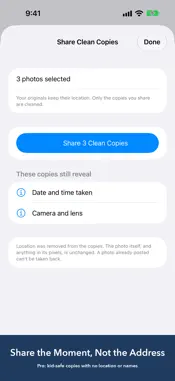
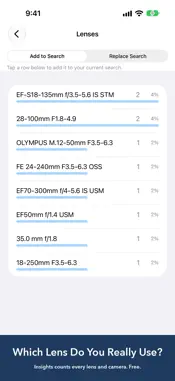
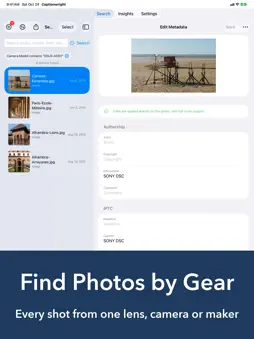
DESCRIPTORS LIVE IN THE FILE Data about your image should travel with your image, not depend on any one app. Apps like Photos keep edits in a private database. Captionwright writes into the photo's own EXIF, IPTC and XMP metadata, so your fixes travel with it. • Artist, Copyright, Description, Comment • IPTC Headline, Caption, Keywords • XMP Title, Subject • Camera make, model, lens, software • Date taken FIND PHOTOS BY THE GEAR THAT TOOK THEM Your camera recorded the lens, camera, date and place of every photo. Captionwright lets you search your whole Apple Photos library by all of it, then write your fixes into the photo file itself. For photographers with more than one camera or lens: • Find every shot from one lens, camera model or camera maker • Find photos by the software that processed them, or by file format FIND PHOTOS BY PLACE AND TIME • Search by place on the map within the distance you choose • Find photos before, after or between dates, by the Photos date or the capture time the camera recorded • Find photos with no location at all, ready to fix SEARCH EXACTLY HOW YOU THINK • Match text in artist, copyright, caption, keywords, title, subject or filename, with plain words, contains, or regular expressions • Combine rules with Match All and Match Any for boolean AND/OR logic, or type a query • Export as a CSV spreadsheet INSIGHTS: SEE HOW YOU ACTUALLY SHOOT Which lens do you really use most? Insights counts photos by lens, camera, focal length, aperture, ISO, shutter speed, year, hour and weekday. Tap a row to jump to those photos. TAG WHO IS IN THE PHOTO Write people's names into the file itself, so it lives beyond the Photos app. • Use IPTC Person Shown, XMP Subject, or both, adding to existing names or replacing them. • Built for family history. The name is written into the file itself, so it is not lost when you export the photo to a local archive, upload it to a family tree site, or hand it down completely outside Captionwright. • Bridge the gap from Photos. Photos recognizes faces and gathers photos of the same person, but that name lives only inside Photos' own database, not in the file itself, so it's lost the moment you export or share. Select those photos, share them to Captionwright, type the name once, and it is written directly into every file. NONDESTRUCTIVE: YOUR ORIGINAL IS ALWAYS KEPT Captionwright never overwrites or deletes your original photo. • JPEG and HEIC: changes are saved as a Photos edit. Photos keeps the untouched original, the edit syncs with iCloud Photos, and Revert in Photos brings the original back any time. • Live Photos: the same in-place edit, with the motion kept and HDR kept where possible. • PNG, TIFF and RAW: iOS can't edit these in place, so Captionwright writes a clearly labeled copy to Files or your library and leaves the original as it was. • The editor shows which applies first. BULK EDITS AND QUICK ACTIONS Change many photos at once, for any writable field including Subject and Title, or tap a quick action: • Copyright stamp • Shift capture time • Strip location (Photos location and GPS data in the file) • Strip all embedded metadata Share Clean Copies shares copies of a selection with no location or names, originals untouched. PRIVATE BY DESIGN Everything happens on your device. No account, no servers, no ads, no tracking. The only network use is Apple's iCloud Photos download of an original that isn't on your device. SEARCH IS FREE. PRO IS ONE PURCHASE. No subscription, no ads. Free: • Full metadata view for any photo • Library index, search and Insights Captionwright Pro, one purchase for iPhone and iPad, unlocks every edit: • Date, location, favorite, hidden and every embedded field, including XMP Title • History and undo of your latest edit • Bulk edit and quick actions • Person tagging from the Photos share sheet • Export edited copies and strip metadata • CSV export For iPhone and iPad. Works with your Apple Photos library, with full or limited access.
What's New
Version 1.1 2026-11-19
Insights goes much deeper in 1.1. • Count your photos by focal length, 35mm-equivalent focal length, aperture, ISO and shutter speed, in ranges. Tap a range to...Insights goes much deeper in 1.1. • Count your photos by focal length, 35mm-equivalent focal length, aperture, ISO and shutter speed, in ranges. Tap a range to see those photos. • See how many photos you took each year or month, and which hours of the day and days of the week you shoot. Tap one to see them. • Tap an hour or weekday to search for those photos, or type hour:14 or weekday:fri. • Count your whole library, your current search, or a date range. • Each row shows its share of your photos as a percentage and a bar. • Insights is now organized into Camera Equipment, Time of Photo, Subject and Photo Type pages. • Export any Insights count as a CSV file (Pro). • Search by 35mm-equivalent focal length with focal35:. Technical Analysis
Package Overview Basic metadata
Bundle ID
com.squishlogic.Captionwright Current Version 1.1
Minimum iOS 26.0
Package Size App Store Size
Package Metadata 0 / 0 version records
Detailed binary, privacy manifest, framework, and Info.plist results have not been indexed for this package yet. The verified App Store and archive metadata above remains available.
Developer Information
Known Version Records
0 version records with stored package metadata
Stored metadata does not guarantee a package is currently available to download.
| Details | Version / IDs | Version date | Action |
|---|