
Preview



Description
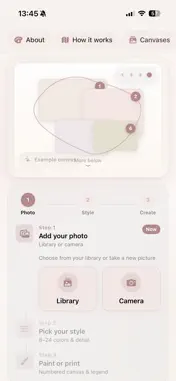
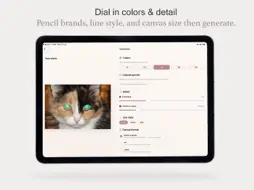
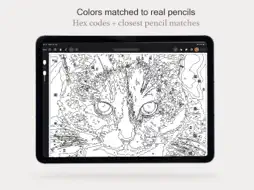
Paint by Code turns your favorite photos into beautiful paint-by-numbers canvases — ready to color in the app or print at home. HOW IT WORKS 1. Add a photo from your library or camera 2. Choose your style — 8 to 24 colors, detail level, and canvas format 3. Generate your numbered canvas with a matching color legend 4. Paint in the app with Apple Pencil, or export to print FEATURES • Smart region detection — clear, paintable areas • Numbered canvas with color legend matched to your palette • Paint mode with Apple Pencil support • Colored pencil matching — see which real pencil matches each color • Export & print — A4, Letter, or square format • Save canvases locally on your device PERFECT FOR • Creative relaxation and mindfulness • Personalized gifts from your own photos • Family projects and rainy-day activities • Artists who love paint-by-numbers Everything runs on your device. Your photos stay private — no account needed, no cloud required. Start with any photo. Finish with something you made.
What's New
Version 1.5 2026-11-24
This 1.5 update is again insane: Added: Color progress — per-number 12/48 in the Colors panel, with a soft completion glow when a color is fully filled Eyedro...This 1.5 update is again insane: Added: Color progress — per-number 12/48 in the Colors panel, with a soft completion glow when a color is fully filled Eyedropper — hold still on the canvas (~0.45s) to pick that palette number (Fill and Brush) Fill all of a number — long-press a color swatch, or Actions → Fill all of selected color Select + transform — Select tool: drag a box around brush strokes, then drag to move, pinch to scale, tap to place Stroke feedback — soft haptics on strokes / fills / completions; optional pencil-style stroke sounds (App Settings) Guided auto-next — when a guided color is complete, jump to the next incomplete number iPad pinned panels — Colors and Layers sit beside the canvas on regular width (not over it) Gallery Create CTA — empty library has a Create a canvas button that opens the Create tab Changed: Paint Studio chrome — leaner top bar (Fill / Brush / Eraser + Colors / Layers + More); side rail collapses by default; tool tips flash briefly then hide Actions panel — View / Paint assist / Canvas groups fold open and closed One More menu — shared overflow content for iOS 27 toolbar and the custom top bar Settings / Customize cards — solid soft surfaces instead of Liquid Glass (no muddy morphing fills on toggles) List / option rows app-wide — hairline rows instead of material plates on gallery, export, wizard, resume, and swatches Studio panels opaque — left rail and floating panels use solid dark fills so labels stay readable over a white canvas Lighter undo — older snapshots drop heavy brush PNGs; stack is byte-capped Faster painting path — per-layer composite cache, cached color progress / layer thumbs / gallery thumbs; autosave + thumbnail encode off the main thread Fixed: Paint Studio left/right panels unreadable over light canvases (translucent glass + white labels) Settings section glass felt wrong on every row / toggle interaction Technical Analysis
Package Overview Basic metadata
Bundle ID
Studiotaupe.Paint-by-Code Current Version 1.5
Minimum iOS 26.2
Package Size App Store Size
Package Metadata 0 / 0 version records
Detailed binary, privacy manifest, framework, and Info.plist results have not been indexed for this package yet. The verified App Store and archive metadata above remains available.
Developer Information
Known Version Records
0 version records with stored package metadata
Stored metadata does not guarantee a package is currently available to download.
| Details | Version / IDs | Version date | Action |
|---|