
Preview




Description
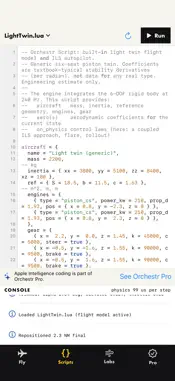
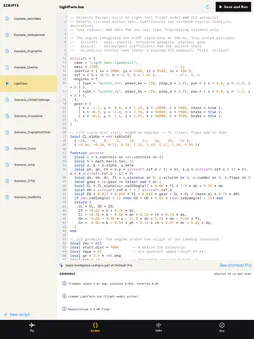
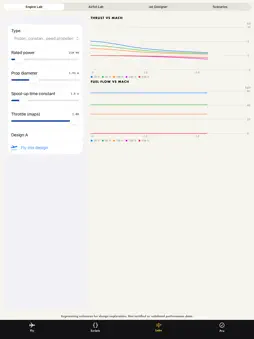
The codable, tweakable flight simulator. HEAD-UP DISPLAY Turn on a collimated HUD over the view: airspeed and altitude tapes, heading, pitch ladder and horizon, flight path vector, bank scale, vertical speed, angle of attack and g, with ILS deviation scales and a flight director cue on the San Francisco approaches. Green, white or amber, with adjustable brightness. Saturnia Script can read every value. Orchestr: Fly-by-Code puts the whole simulator in your hands. Every aircraft is a Saturnia Script you can read and change while it flies: lift and drag tables, engines and thrust, mass and inertia, landing gear, control laws and autopilots. Save, and the change hot-reloads mid-flight. SATURNIA SCRIPT A small, readable scripting language (Lua 5.4) with a flight-simulation API. Write forces and moments, aero coefficient tables, fly-by-wire laws, failures, weather, lighting events and your own HUD widgets. Scripts run in a sandbox with a time slice, so a runaway loop can never freeze the simulator. Clear errors with line numbers appear in the built-in editor and console. APPLE INTELLIGENCE CODING Describe a change in plain words ("add an engine fire at 2000 ft") and the on-device model writes the script. Every proposal is compiled first and shown as a diff before anything runs. Explain a script or fix an error from the console in one click. Available on devices with Apple Intelligence. LABS Design airfoils from NACA codes, a Bezier canvas or imported coordinate files and analyse them with a panel method and boundary layer: lift, drag and moment polars, pressure distribution, transition and stall. Build a wing, pick an engine (piston, turboprop, turbojet, turbofan, electric or rocket), and fly the result in test scenarios: stall entry, crosswind landing, gusts, icing, engine-out climb, STOL and climb challenges, with telemetry plots to compare versions. Results are engineering estimates. THE WORLD A real-time Metal renderer streams satellite imagery and elevation for the whole globe. Airports come with runway markings and full approach, runway and taxiway lighting, PAPI that changes colour with your glide path, and rotating beacons. Time of day uses real sun, moon and star positions, with haze, fog by RVR, cloud layers, rain and wet runway reflections. FOR SIMULATOR BUILDERS (PRO) Drive Orchestr: Fly-by-Code from your own flight model over CIGI 3.3 and 4.0, X-Plane UDP or JSON. Configure multiple display channels, sync several Macs, connect joysticks, yokes, cockpit panels and motion platforms, and measure transport delay with the built-in test mode. Orchestr: Fly-by-Code is not a qualified training device; qualification remains the operator's responsibility with their authority. ORCHESTR PRO Optional subscription (monthly or yearly with a free trial) or one-time lifetime purchase. Payment is charged to your Apple Account. Subscriptions renew automatically unless cancelled at least 24 hours before the end of the period. Manage them in your account settings. Terms of Use: https://www.apple.com/legal/internet-services/itunes/dev/stdeula/ Privacy: https://www.orchaerospace.com/privacy#saturnia Support: [email protected]
What's New
Version 1.1 2026-11-24
Head-up display. Turn on a collimated HUD over the view: airspeed and altitude tapes, heading, pitch ladder, flight path vector, bank, vertical speed, angle of ...Head-up display. Turn on a collimated HUD over the view: airspeed and altitude tapes, heading, pitch ladder, flight path vector, bank, vertical speed, angle of attack and g, plus ILS deviation and flight director cues on the San Francisco approaches. Use the HUD button on the Fly tab, the instructor panel, the H key on a keyboard or a controller's Options button. Choose green, white or amber. Saturnia Script can read it with sat.hud.get(). Technical Analysis
Package Overview Basic metadata
Bundle ID
com.orchestrsim.ig Current Version 1.1
Minimum iOS 17.0
Package Size App Store Size
Package Metadata 0 / 0 version records
Detailed binary, privacy manifest, framework, and Info.plist results have not been indexed for this package yet. The verified App Store and archive metadata above remains available.
Developer Information
Known Version Records
0 version records with stored package metadata
Stored metadata does not guarantee a package is currently available to download.
| Details | Version / IDs | Version date | Action |
|---|