
Preview



Description
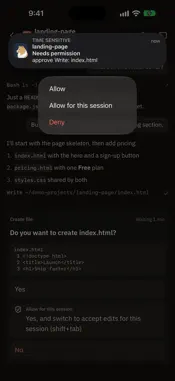
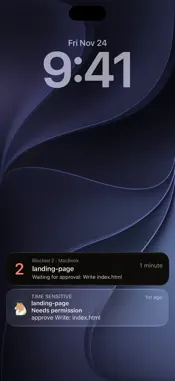
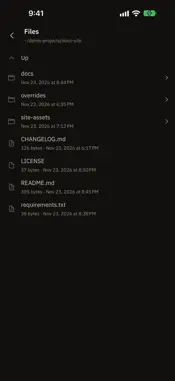
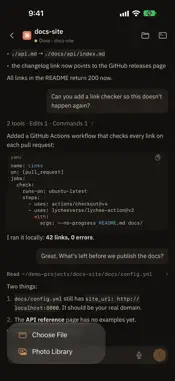
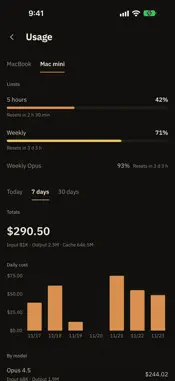
You start Claude Code on a task, step away for a minute, and come back to find it has been sitting on "Can I create this file?" for twenty minutes. Sheltie sends that question to your iPhone the moment it shows up. Long-press the notification, tap Allow, Allow for this session or Deny, and the agent is back to work. No need to open the app. On our Mac the push arrives in under a second. SEE WHAT YOU'RE APPROVING The file it wants to write, the command it wants to run, or the options it wants you to pick from are right there on the card. None of the options fit? Type your own answer. Sheltie checks the screen again before sending and won't answer a prompt that has changed. READ IT LIKE A CHAT Scroll through what the agent has done so far, with code blocks intact and tool calls folded to one line. Reply to give it the next job, by typing or by voice. START WORK FROM YOUR PHONE Pick a folder, type what you want done, and a new agent starts on your computer. ALL YOUR COMPUTERS IN ONE LIST Connect your home Mac and your work PC and see every agent on one screen: done, waiting on you, or still working. USAGE AT A GLANCE Check how much of your Claude 5-hour and weekly limits is left. OTHER CODING AGENTS TOO Codex, Gemini CLI, Qwen Code, OpenCode, Grok Build, GitHub Copilot CLI, Cursor Agent, Amp get approvals, question answers, plan approval, the conversation view and messages. A few menus, like several questions at once, only send a notification and you answer on the computer. GETTING STARTED Paste one command into Terminal on your Mac or PowerShell on Windows, and scan the QR code it shows. The app reaches your computer only through your own Tailscale network. The server is open source: github.com/hyperfocuslab/sheltie WHAT YOU NEED - A Mac or Windows PC running Claude Code or Codex. Approvals and questions work in the terminal you already use. The live terminal screen, messages, new tasks from the phone and the other agents above need herdr. - Tailscale on the computer and the iPhone No ads, no subscription, no in-app purchases, no sign-up. Sheltie is an independent app by Hyperfocus Lab, not affiliated with Anthropic or any other agent maker, or the herdr project.
What's New
Version 1.0.8 2026-11-28
Antigravity CLI (agy) sessions now show the Antigravity icon. Tapping the conversation body now hides the keyboard. Technical Analysis
Package Overview Basic metadata
Bundle ID
com.hyperfocuslab.sheltie Current Version 1.0.8
Minimum iOS 18.0
Package Size App Store Size
Package Metadata 0 / 0 version records
Detailed binary, privacy manifest, framework, and Info.plist results have not been indexed for this package yet. The verified App Store and archive metadata above remains available.
Known Version Records
0 version records with stored package metadata
Stored metadata does not guarantee a package is currently available to download.
| Details | Version / IDs | Version date | Action |
|---|